Summary of functions
The multi-information display presents the driver with a variety of driving- related data, such as the current outside temperature. The multi-information display can also be used to change the display settings and other settings.

- Indicators
- Driving assist system status display area
Displays the operational status of the following systems:- Dynamic radar cruise control with full-speed range
- LDA (Lane Departure Alert with steering control)
- Speed limit display (vehicles with a navigation system) (U.S.A.only)
- Speedometer
The speedometer display can be enabled/disabled in on the multi-information display. When
 is selected, the speedometer may be displayed in the content display area.
- Content display area
A variety of information can be displayed by selecting a menu icon. Additionally, warning or suggestion/advice pop-up displays will be displayed in some situations.- Menu icon content
- Suggestion function
- Warning message
- Odometer/trip meter
- Shift position
- Outside temperature
- Menu icons
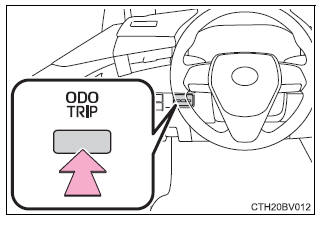
- "ODO/TRIP" switch
- Meter control switches
Using the multi-information display
Using the content display area
The content display area is operated using the meter control switches.
- Scroll screens*, change the displayed content* and move the cursor
- Press: Enter/Set
- Press and hold: Reset/Display the next screen
- Return to the previous screen

Pressing and holding the switch will display the first screen of the selected menu icon.
*: When the screen can be scrolled or different content can be displayed, a mark, such as an arrow, will be displayed to suggest which switch to operate.
Using the odometer/trip meter
Items in this area are operated using the "ODO/TRIP" switch.
Press: Change displayed item
Each time the switch is pressed, the displayed item will be changed.
Press and hold: Reset
Display the desired trip meter and press and hold the switch to reset the trip meter.