Basic functions - Dynamic radar cruise control
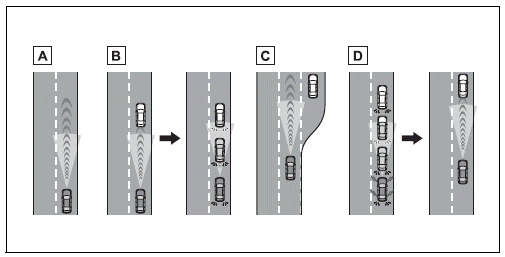
- Constant speed cruising: When there are no vehicles ahead
The vehicle drives at the speed set by the driver.
If the set vehicle speed is exceeded while driving down a hill, the set vehicle speed display will blink and a buzzer will sound.
- Deceleration and follow-up cruising: When a preceding vehicle driving slower than the set vehicle speed is detected
When a vehicle is detected driving ahead of your vehicle, the vehicle automatically decelerates and if a greater reduction in vehicle speed is necessary, the brakes are applied (the stop lights will come on at this time). The vehicle is controlled to maintain the vehicle-to-vehicle distance set by the driver, in accordance with changes in the speed of the preceding vehicle. If vehicle deceleration is not sufficient and the vehicle approaches the vehicle ahead, the approach warning will sound.
- Acceleration: When there are no longer any preceding vehicles driving slower than the set vehicle speed
The vehicle accelerates until the set vehicle speed is reached and then resumes constant speed cruising.
- Starting off: If a preceding vehicle stops, the vehicle will also stop (controlled stop). After the preceding vehicle starts off, pressing the "RES" switch or depressing the accelerator pedal will resume follow-up cruising (start off operation). If a start off operation is not performed, the controlled stop will continue.
System Components
■ Meter display
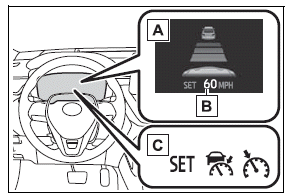
- Multi-information display
- Set vehicle speed
- Indicators
■ Switches
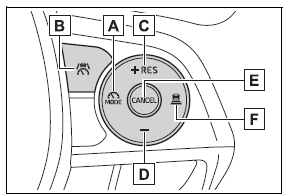
- Driving assist mode select switch
- Driving assist switch
- "+" switch / "RES" switch
- "-" switch
- Cancel switch
- Vehicle-to-vehicle distance switch