Customize Parameters
CUSTOMIZE PARAMETERS
CUSTOMIZE LIGHTING SYSTEM (EXT)
NOTICE:
- When the customer requests a change in a function, first make sure that the function can be customized.
- Be sure to make a note of the current settings before customizing.
- When troubleshooting a function, first make sure that the function is set to the default setting.
HINT:
The following items can be customized.
(a) Customizing with the GTS
(1) Enter the following menus: Customize Setting / Light Control or Warning.
(2) Select the setting by referring to the table below.
Light ControlTester Display | Description | Default | Setting | ECU |
|---|---|---|---|---|
Tail Remind Buzzer Function |
Sounds a buzzer when the driver door is opened with the light control switch in the tail or head position. |
Enable |
$00:Disable,$01:Enable |
Main Body ECU (Multiplex Network Body ECU) |
Light up Clearance Lights at Door Unlock Function |
Turns on the parking lights for 15 seconds when the doors are unlocked by the smart key or the wireless key. |
Enable |
$00:Disable,$01:Enable |
Main Body ECU (Multiplex Network Body ECU) |
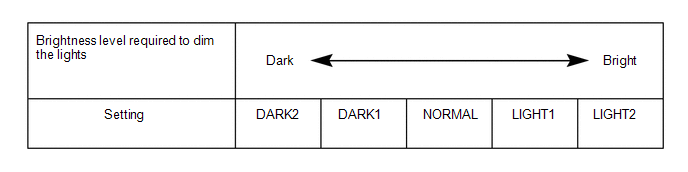
Brightness Level Adjust (Lowering) |
Changes the ambient brightness level required to dim the lights such as the indicator lights of the combination meter, A/C indicator light and clock.*A |
Normal |
$00:Normal,$01:Dark2,$02:Dark1,$03:Light1,$04:Light2 |
Main Body ECU (Multiplex Network Body ECU) |
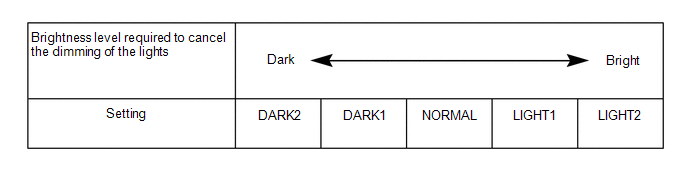
Brightness Level Adjust (Canceling) |
Changes the ambient brightness level required to cancel the dimming of the lights such as the indicator lights of the combination meter, A/C indicator light and clock.*B |
Normal |
$00:Normal,$01:Dark2,$02:Dark1,$03:Light1,$04:Light2 |
Main Body ECU (Multiplex Network Body ECU) |
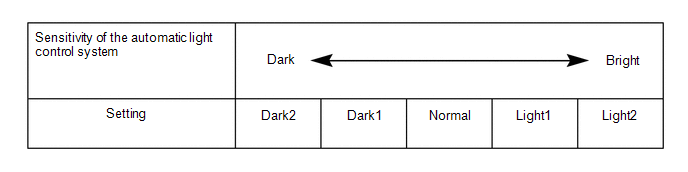
Sensitivity Adjust |
Adjusts the sensitivity of the automatic light control system.*C |
Normal |
$00:Normal,$01:Dark2,$02:Dark1,$03:Light1,$04:Light2 |
Main Body ECU (Multiplex Network Body ECU) |
Light Auto OFF Delay Setting |
Keeps the headlights on for a certain period of time after turning the ignition switch off and closing all of doors with the low beam headlights on. |
30sec |
$00:OFF,$01:30sec,$02:60sec,$03:90sec |
Main Body ECU (Multiplex Network Body ECU) |
DRL Function |
Turns the DRL function on/off.*1 |
Enable |
$00:Disable,$01:Enable |
Main Body ECU (Multiplex Network Body ECU) |
- *1: for vehicles with customize setting "DRL Function"
HINT:
The sensitivity adjustment may be difficult to confirm. Check by driving the vehicle.
- *A
- *B
- *C
Tester Display | Description | Default | Setting | ECU |
|---|---|---|---|---|
AFS Function |
Turns the AFS function on/off. |
Valid |
$00:Valid,$01:Invalid |
HEADLIGHT ECU SUB-ASSEMBLY LH |
Tester Display | Description | Default | Setting | ECU |
|---|---|---|---|---|
Lane Change Flashing Times Adjust |
Function to change the lane change flashing times. |
3 |
$00:OFF,$01:3,$02:4,$03:5,$04:6,$05:7 |
Combination Meter Assembly |
(b) Customizing with the multi-display
(1) Turn the ignition switch to ON.
(2) Enter the following menus: MENU / Setup / Vehicle / Vehicle Customization / Lights Settings.
(3) Select the setting by referring to the table below.
Display | Default | Content | Setting | Relevant ECU |
|---|---|---|---|---|
Headlights Auto-on Sensitivity |
0 |
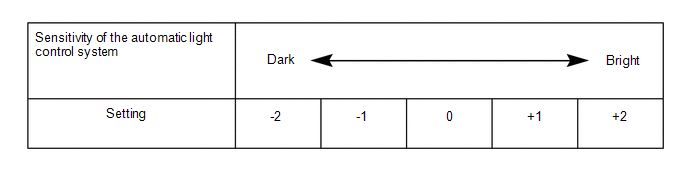
Adjusts the sensitivity of the automatic light control system.*A |
-2, -1, 0, +1 or +2 |
Main Body ECU (Multiplex Network Body ECU) |
Headlight Auto-off Timer |
30 sec. |
Keeps the headlights on for a certain period of time after turning the ignition switch off and closing all of doors with the low beam headlights on. |
Off, 30 sec., 60 sec. or 90 sec. |
Main Body ECU (Multiplex Network Body ECU) |
Daytime Running Lights*1 |
On |
Turns the DRL function on/off. |
On or Off |
Main Body ECU (Multiplex Network Body ECU) |
Exterior Light Auto-off Timer |
15 sec. |
Changes the lighting time of the welcome light illuminations. |
Off, 7.5 sec., 15 sec. or 30 sec. |
Main Body ECU (Multiplex Network Body ECU) |
- *1: for vehicles with customize setting "Daytime Running Lights"
HINT:
The sensitivity adjustment may be difficult to confirm. Check by driving the vehicle.
- *A