Driving monitor
Items displayed can be switched by pressing the “DISP” switch.
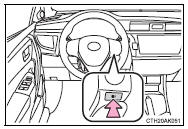
Displays the average fuel consumption since the function was reset.
• Press and hold the “DISP” switch to reset when the average fuel consumption is displayed.• Use the displayed average fuel consumption as a reference.
■ Current fuel consumptionDisplays the current rate of fuel consumption.
Use the displayed current fuel consumption as a reference.
■ Driving rangeDisplays the estimated maximum distance that can be driven with the quantity of fuel remaining.
• This distance is computed based on your average fuel consumption. As a result, the actual distance that can be driven may differ from that displayed.• When only a small amount of fuel is added to the tank, the display may not be updated.
When refueling, turn the engine switch off. If the vehicle is refueled without turning the engine switch off, the display may not be updated.
■ Average vehicle speedDisplays the average vehicle speed since the engine was last started.
■ Elapsed timeDisplays the elapsed time since the engine was started.
■ CustomizationLanguage and Eco Driving Indicator Light settings can be changed.
■ Eco Driving Indicator Zone Display (except vehicles with a manual transmission)Test yourself
A quick Toyota Corolla quiz: every answer comes with an explanation and a link to the manual page.