Vehicle status information and indicators
Odometer and trip meter display
In this manual: Vehicle status information and indicators
2steps
~12min
1/5difficulty
Done 0 of 2
■ Changing the display
Press the display change button until the desired item is displayed.
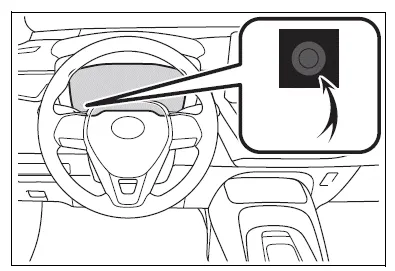
■ Display items
- Odometer
Displays the total distance the vehicle has been driven.
- Trip meter A/Trip meter B
Displays the distance the vehicle has been driven since the meter was last reset. Trip meters A and B can be used to record and display different distances independently.
To reset, display the desired trip meter and press and hold the display change button.
Changing the instrument panel light brightness
The brightness of the instrument panel lights can be adjusted.
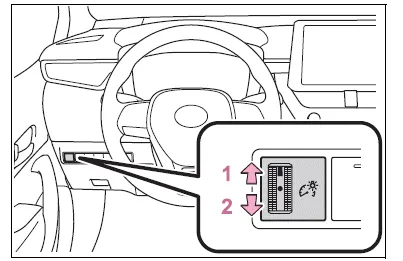
- Brighter
- Darker
■Instrument panel light brightness adjustment
The brightness of the instrument panel lights can be adjusted separately for when the tail lights are on and off.
Adjusting the clock
■ The clocks can be adjusted on the audio system screen.
Refer to "MULTIMEDIA OWNER'S MANUAL".
Test yourself
A quick Toyota Corolla quiz: every answer comes with an explanation and a link to the manual page.
Was this page helpful?