RCTA function
■ Operation of the RCTA function
The RCTA function uses rear side radar sensors to detect vehicles approaching from the right or left at the rear of the vehicle and alerts the driver of the presence of such vehicles by flashing the outside rear view mirror indicators and sounding a buzzer.
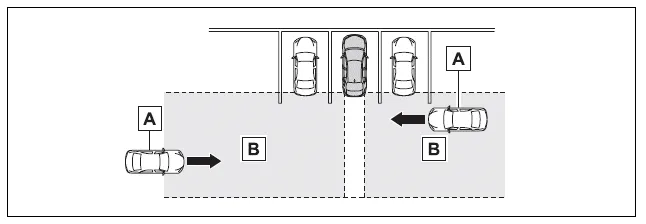
- Approaching vehicles
- Detection areas of approaching vehicles
■ RCTA icon display
When a vehicle approaching from the right or left at the rear of the vehicle is detected, the following will be displayed on the audio system screen.
Example: Vehicles are approaching from both sides of the vehicle

■ RCTA function detection areas
The areas that vehicles can be detected in are outlined below.
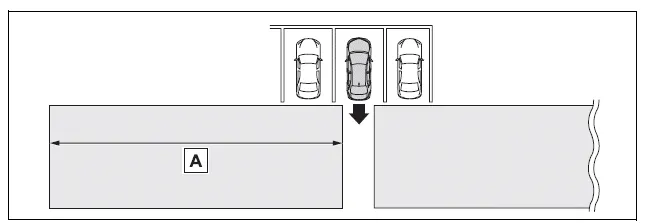
The buzzer can alert the driver of faster vehicles approaching from farther away.
Example:

■The RCTA function is operational when
The RCTA function operates when all of the following conditions are met:
- The engine switch is in ON.
- The RCTA function is on.
- The shift lever is in R.
- The vehicle speed is less than approximately 15 km/h.
- The approaching vehicle speed is between approximately 8 km/h and 56 km/h.
■Setting the buzzer volume
The buzzer volume can be adjusted on the multi-information display.
The volume of the RCTA buzzer can be adjusted on  (4.2-inch display) or
 (7-inch display) of the multi-information display.
■Conditions under which the system will not detect a vehicle
The RCTA function is not designed to detect the following types of vehicles and/or objects:
- Vehicles approaching from directly behind
- Vehicles backing up in a parking space next to your vehicle
- Vehicles that the sensors cannot detect due to obstructions
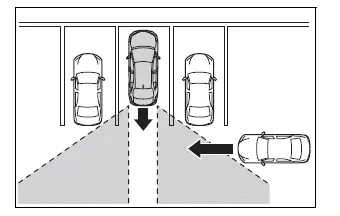
- Guardrails, walls, signs, parked vehicles and similar stationary objects*
- Small motorcycles, bicycles, pedestrians, etc.*
- Vehicles moving away from your vehicle
- Vehicles approaching from the parking spaces next to your vehicle*
- The distance between the sensor and approaching vehicle gets too close
*: Depending on the conditions, detection of a vehicle and/or object may occur.
■Situations in which the system may not operate properly
The RCTA function may not detect vehicles correctly in the following situations:
- When the sensor is misaligned due to a strong impact to the sensor or its surrounding area
- When mud, snow, ice, a sticker, etc., is covering the sensor or surrounding area on the position above the rear bumper
- When driving on a road surface that is wet with standing water during bad weather, such as heavy rain, snow, or fog
- When multiple vehicles are approaching with only a small gap between each vehicle
- When a vehicle is approaching at high speed
- When equipment that may obstruct a sensor is installed, such as a towing eyelet, bumper protector (an additional trim strip, etc.), bicycle carrier, or snow plow
- When backing up on a slope with a sharp change in grade
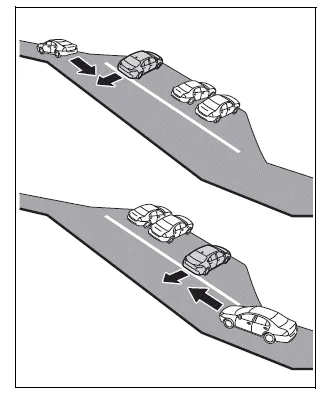
- When backing out of a sharp angle parking spot
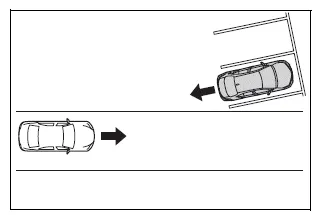
- Immediately after the RCTA function is turned on
- Immediately after the engine is started with the RCTA function on
- When the sensors cannot detect a vehicle due to obstructions
- When towing a trailer
- When there is a significant difference in height between your vehicle and the vehicle that enters the detection area
- When a sensor or the area around a sensor is extremely hot or cold
- If the suspension has been modified or tires of a size other than specified are installed
- If the front of the vehicle is raised or lowered due to the carried load
- When turning while backing up
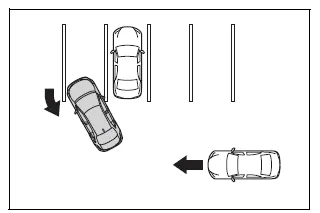
- When a vehicle turns into the detection area
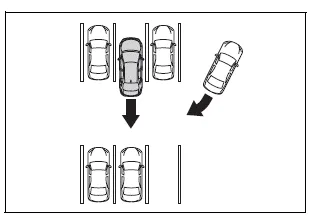
■Situations in which the system may operate even if there is no possibility of a collision
Instances of the RCTA function unnecessary detecting a vehicle and/or object may increase in the following situations:
- When the parking space faces a street and vehicles are being driven on the street
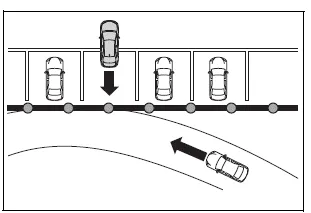
- When the distance between your vehicle and metal objects, such as a guardrail, wall, sign, or parked vehicle, which may reflect electrical waves toward the rear of the vehicle, is short
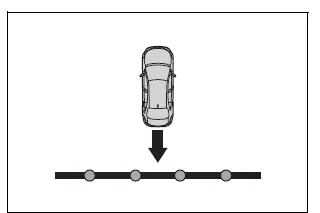
- When equipment that may obstruct a sensor is installed, such as a towing eyelet, bumper protector (an additional trim strip, etc.), bicycle carrier, or snow plow
- When a vehicle passes by the side of your vehicle
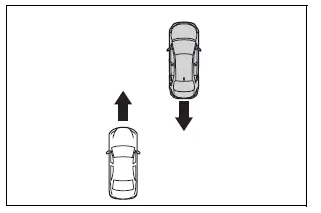
- When a detected vehicle turns while approaching the vehicle
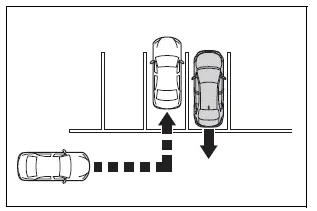
- When there are spinning objects near your vehicle such as the fan of an air conditioning unit
- When water is splashed or sprayed toward the rear bumper, such as from a sprinkler
- Moving objects (flags, exhaust fumes, large rain droplets or snowflakes, rain water on the road surface, etc.)
- When the distance between your vehicle and a guardrail, wall, etc., that enters the detection area is short
- Gratings and gutters
- When a sensor or the area around a sensor is extremely hot or cold
- If the suspension has been modified or tires of a size other than specified are installed
- If the front of the vehicle is raised or lowered due to the carried load
Test yourself
A quick Toyota Corolla quiz: every answer comes with an explanation and a link to the manual page.