Starting the engine
1 Continuously variable transmission: Ensure that the shift lever is in P and depress the brake pedal.
Manual transmission: Shift the shift lever to N and depress the clutch pedal.
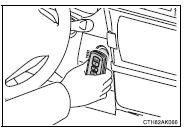
2 Touch the Toyota emblem side of the electronic key to the engine switch.
When the electronic key is detected, a buzzer sounds and the engine switch will turn to IGNITION ON mode.
When the smart key system is deactivated in customization setting, the engine switch will turn to ACCESSORY mode.
3 Vehicles without a multi-information display: Firmly depress the brake pedal (continuously variable transmission) or clutch pedal (manual transmission) and check that the smart key system indicator light (green) turns on.
Vehicles with a multi-information display: Firmly depress the brake pedal (continuously variable transmission) or clutch pedal (manual transmission) and check that  is shown on the multi-information display.
4 Press the engine switch.
In the event that the engine still cannot be started, contact your Toyota dealer.
■Stopping the engineShift the shift lever to P (continuously variable transmission) or N (manual transmission) and press the engine switch as you normally do when stopping the engine.
■Replacing the key batteryAs the above procedure is a temporary measure, it is recommended that the electronic key battery be replaced immediately when the battery is depleted.
■Changing engine switch modesRelease the brake pedal (continuously variable transmission) or clutch pedal (manual transmission) and press the engine switch in step 3 above.
The engine does not start and modes will be changed each time the switch is pressed. ■When the electronic key does not work properly ●Make sure that the smart key system has not been deactivated in the customization setting. If it is off, turn the function on.●Check if battery-saving mode is set. If it is set, cancel the function.
Test yourself
A quick Toyota Corolla quiz: every answer comes with an explanation and a link to the manual page.