Driving
Using the rear view monitor system
In this manual: Driving
~1min read
■ Screen description
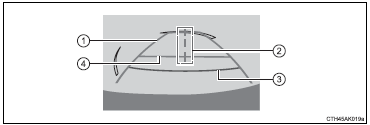
1 Vehicle width guide lines The line indicates a guide path when the vehicle is being backed straight up.
The displayed width is wider than the actual vehicle width.
2 Vehicle center guide lines These lines indicate the estimated vehicle center on the ground.
3 Distance guide line The line shows points approximately 1.5 ft. (0.5 m) (red) from the center of the edge of the bumper.
4 Distance guide line The line shows distance behind the vehicle, a point approximately 3 ft.
(1 m) (blue) from the edge of the bumper.
Test yourself
A quick Toyota Corolla quiz: every answer comes with an explanation and a link to the manual page.
Was this page helpful?