Wireless remote control/electronic key battery
● Flathead screwdriver ● Small flathead screwdriver ● Lithium battery CR2016 (vehicles without a smart key system), or CR2032 (vehicles with a smart key system)
Replacing the battery ► Vehicles without a smart key system 1 Remove the cover.To prevent damage to the key, cover the tip of the screwdriver with a rag.
To prevent the buttons from being disassembled, face the button surface downward.
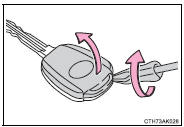
2 Remove the module.
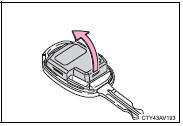
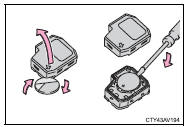
3 Open the case cover using a coin protected with tape etc.
and remove the depleted battery using a small flathead screwdriver.
Insert a new battery with the “+” terminal facing up.
► Vehicles with a smart key system
1 Take out the mechanical key.
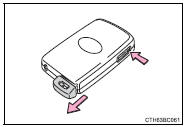
2 Remove the cover.
To prevent damage to the key, cover the tip of the screwdriver with a rag.
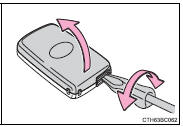
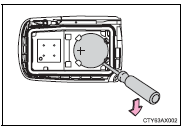
3 Remove the depleted battery.
Insert a new battery with the “+” terminal facing up.
●Dispose of used batteries according to local laws.
■If the key battery is depletedThe following symptoms may occur:
●The smart key system (if equipped) and wireless remote control will not function properly.●The operational range will be reduced.
CAUTION ■Removed battery and other partsThese parts are small and if swallowed by a child, they can cause choking.
Keep away from children. Failure to do so could result in death or serious injury.
NOTICE ■For normal operation after replacing the batteryObserve the following precautions to prevent accidents:
●Always work with dry hands. Moisture may cause the battery to rust. ●Do not touch or move any other component inside the remote control.●Do not bend either of the battery terminals.
Test yourself
A quick Toyota Corolla quiz: every answer comes with an explanation and a link to the manual page.