Changing settings of the power back door system
The settings of the power back door system can be changed by displaying the "Vehicle Settings" - "PBD" screen from the  screen of the multi-information display.
The changed power back door settings are not reset by turning the engine switch to OFF. In order to restore the original settings, they need to be changed back on the  screen of the multi-information display.
Adjusting the open position of the power back door
The open position of the power back door can be adjusted.
1. Stop the power back door at the desired position.
2. Press and hold the  switch on the lower part of the power back door for 2 seconds.
- When setting is complete, a buzzer will sound 4 times.
- The next time the power back door is opened, it will stop at that position.
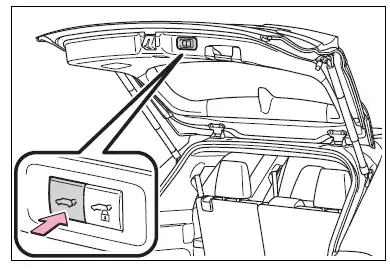
■Returning the power back door opening position to the default setting
Press and hold the  switch on the lower part of the power back door for 7 seconds.
After the buzzer sounds 4 times, it sounds twice more. When the power back door does the opening operation the next time, the door will open to the initial settings position.

■Customization
The opening position can be set with the multi-information display.
Priority for the stop position is given to the last position set by either the  switch or multi-information display.