Interior features
Air conditioning controls
In this manual: Interior features
4steps
~24min
2/5difficulty
Done 0 of 4
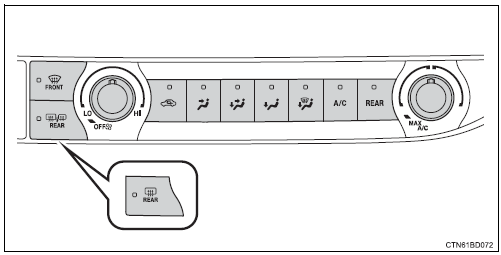
Adjusting the temperature setting
To adjust the temperature setting, turn  clockwise (warm) or
counterclockwise (cool).
If  is not pressed, the system will
blow ambient temperature air or heated air.
For quick cooling, turn  to the "max
a/c" position. The air conditioning will automatically turn on in recirculated air mode.
To adjust the fan speed, turn 
clockwise (increase) or counterclockwise (decrease).
Turning the dial to “off” turns off the fan.
Changing airflow modesTo change the airflow mode, press  ,
 ,
 or
 .
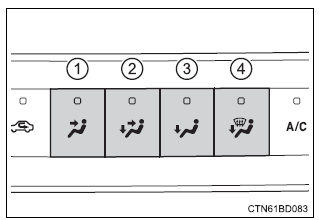
- Air flows to the upper body.
- Air flows to the upper body and feet.
- Air flows to the feet.
- Air flows to the feet and the windshield defogger operates.
Was this page helpful?