Programming the homelink
The homelink® compatible transceiver in your vehicle has 3 buttons which can be programmed to operate 3 different devices. Refer to the programming method below appropriate for the device.
- Buttons
- Homelink® indicator light
- Garage door operation indicators
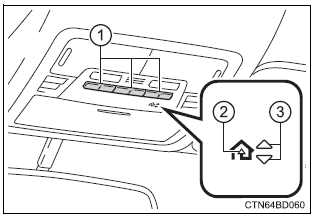
Before programming homelink
- During programming, it is possible that garage doors, gates, or other devices may operate. For this reason, make sure that people and objects are clear of the garage door or other devices to prevent injury or other potential harm.
- It is recommended that a new battery be placed in the remote control transmitter for more accurate programming.
- Garage door openers manufactured after 1995 may be equipped with rolling code protection. If this is the case, you will need a stepladder or other sturdy, safe device to reach the "learn" or "smart" button on the garage door opener motor.
- Point the remote control transmitter for the device 1 to 3 in. (25 To 75 mm) from the homelink® buttons.
Keep the homelink® indicator light in view while programming.

- For u.S.A. Owner’s
- Press and hold the homelink® button you want to program and the handheld transmitter button simultaneously.
When the homelink® indicator light changes from slowly flashing orange to rapidly flashing green (rolling code) or continuously lit green (fixed code), release both buttons.
- Programming an entry gate (for u.S.A. Owners)/programming a device in the canadian market
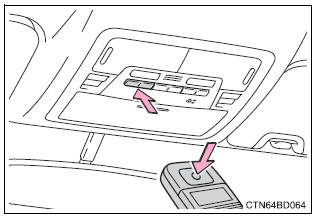
- With one hand, press and hold the homelink® button you want to program. With your other hand, press and release the remote control transmitter every 2 seconds and repeat this cycle until the homelink® indicator light starts to flash rapidly. Then, release the buttons.
- Test the homelinkr operation by pressing the newly programmed button and observing the indicator light:
- if the indicator light is solid/continuous, programming has been completed and your device should activate when the homelinkr button is pressed and released.
- If the indicator light blinks rapidly for 2 seconds and then turns into a solid/continuous light, proceed to the heading "programming a rolling code system".
- Repeat the steps above to program another device for any of the remaining homelinkr buttons.
- Locate the “learn” or “smart” button on the garage door opener motor in the garage. This button can usually be found where the hanging antenna wire is attached to the unit. The name and color of the button may vary by manufacturer.
Please refer to the owner’s manual supplied with the garage door opener motor for details.

- Press and release the “learn” or “smart” button.
Perform 3 within 30 seconds after performing 2.

- Press and hold the programmed homelink® button (located inside the vehicle) for 2 seconds and release it. Repeat this sequence (press/ hold/release) up to 3 times to complete programming.
If the garage door opener motor activates when the homelink® button is pressed, the garage door opener motor recognizes the homelink® signal.
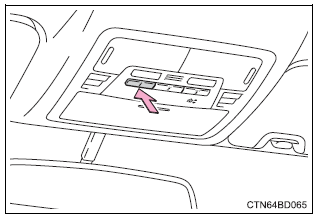
Enabling 2-way communication with a garage door (only available for compatible devices)
When enabled, 2-way communication allows you to check the status of the opening and closing of the garage door through indicators in your vehicle.
2-Way communication is only available if the garage door opener motor used is a compatible device. (To check device compatibility, refer to the owner's manual supplied with the garage door opener motor.)
- Press a programmed homelinkr button to operate a garage door.
- Within 1 minute of pressing the homelinkr button, after the garage door operation has stopped, press the "learn" or "smart" button on the garage door opener motor. Within 5 seconds of the establishment of 2-way communication with the garage door opener, both garage door operation indicators in the vehicle will flash rapidly (green).
When the following procedure is performed, buttons which already have devices registered to them can be overwritten:
- With one hand, press and hold the desired homelink® button.
- When the homelink® indicator starts flashing, continue to hold the homelink® button and perform “programming homelink®” from 1 (it takes 20 seconds for the homelink® indicator to start flashing).
Press the appropriate homelink® button. The homelink® indicator light should turn on.