Gauges and meters

- Tachometer
Displays the engine speed in revolutions per minute
- Engine coolant temperature gauge
Displays the engine coolant temperature
- Fuel gauge
Displays the quantity of fuel remaining in the tank
- Speedometer
Displays the vehicle speed
- Voltmeter
Displays the charge state
- Multi-information display
Presents the driver with a variety of driving-related data
- Odometer and trip meter
Odometer: Displays the total distance the vehicle has been driven Trip meter: Displays the distance the vehicle has been driven since the meter was last reset. Trip meters A and B can be used to record and display different distances independently.
- Engine oil pressure gauge
Displays the engine oil pressure
- Odometer/trip meter display change button
Switches between odometer and trip meter displays
- Instrument panel light control dial
The brightness of the instrument panel light can be adjusted
Switching the displayPressing this button switches between odometer and trip meter.

- Odometer
- Trip meter A*
- Trip meter B*
*:Pushing and holding the button will reset the trip meter.
Eco Driving Indicator Light customizationEco Driving Indicator Light can activated or deactivated.
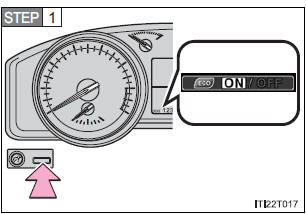
While the odometer is being displayed, press and hold the odometer/trip meter display change button to display the Eco Driving Indicator Light customization screen.
STEP 2Press the odometer/trip meter display change button to set Eco Driving Indicator Light to on or off.
STEP 3Press and hold the odometer/trip meter display change button to complete the setting.
Instrument panel light controlThe brightness of the instrument panel lights can be adjusted.
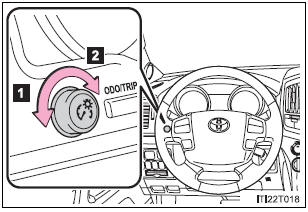
- Darker
- Brighter
- The meters and display illuminate when
The “ENGINE START STOP” switch is in IGNITION ON mode.
- The brightness of the instrument panel lights
When the tail lights are turned on, the meter’s brightness will be reduced slightly unless the meter brightness level adjustment is set to the brightest setting.
If the tail lights are turned on when the surroundings are dark, the meter’s brightness will reduce slightly. However, when the surroundings are bright, such as during the daytime, the meter’s brightness will not be reduced even if the tail lights are turned on.
NOTICE- To prevent damage to the engine and its components
- Do not let the indicator needle of the tachometer enter the red zone, which indicates the maximum engine speed.
- The engine may be overheating if the engine coolant temperature gauge is in the red zone (“H”). In this case, immediately stop the vehicle in a safe place, and check the engine after it has cooled completely.
- Voltmeter
When the voltmeter indicates 19 V or higher or 9 V or lower while the engine is running, there may be a battery or charging system malfunction. Have the vehicle inspected at your Toyota dealer.
- Engine oil pressure gauge
When the value of the engine oil pressure gauge drops while the engine is running, stop the vehicle in a safe place immediately and check the amount of engine oil. When the oil pressure drops even though the engine oil amount has not decreased, or if the oil pressure does not increase when engine oil is added, contact your Toyota dealer, as there may be a problem with the lubrication system.
Test yourself
A quick Toyota Land Cruiser quiz: every answer comes with an explanation and a link to the manual page.