Adjusting the mirror
■ Adjusting the mirror height
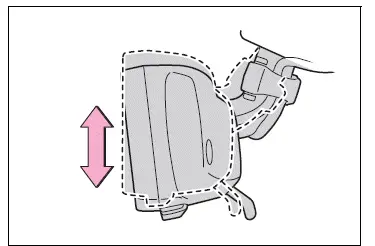
The height of the rear view mirror can be adjusted to suit your driving posture.
Change to optical mirror mode, adjusting the height of the rear view mirror by moving it up and down.
■ Display settings (digital mirror mode)
Settings of the display in the digital mirror mode, on/off operation of the automatic anti-glare function, etc. can be changed.
1. Press the menu button.
The icons will be displayed.
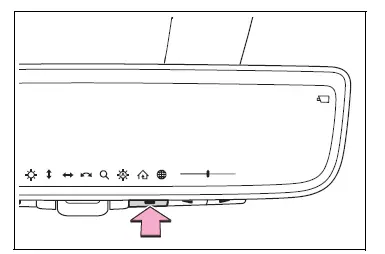
2. Press the menu button repeatedly and select the item you want to adjust.
3. Press  or
 to
change the setting.
The icons will disappear if a button is not operated for approximately 5 seconds or more.
 Select to adjust the brightness
of the display.
 Select to adjust the area
displayed up/down.
 Select to adjust the area
displayed to the left/right.
 Select to adjust the angle of
the displayed image.
 Select to zoom in/out the
displayed image.
 Select to enable/disable the
automatic anti-glare function.* Responding to the brightness of the headlights of vehicles behind, the reflected light is automatically adjusted.
The automatic anti-glare function is enabled each time the engine switch is changed to ON.
 Select to display
HomeLink Training Tutorial to assist customers to train their Garage Door Opener System.
 Select to change the language
of the Homelink Training Tutorial.
*: This is a function for the optical mirror mode, however, the setting can also be changed while using the digital mirror mode.
■ Enabling/disabling the automatic anti-glare function (optical mirror mode)
The automatic anti-glare function in the optical mirror mode can be enabled/disabled. The setting can be changed in both the digital mirror mode and the optical mirror mode.
When using the optical mirror mode
1. Press the menu button.
The icons will be displayed.
2. Press the menu button repeatedly and select  .
The setting display will be displayed.
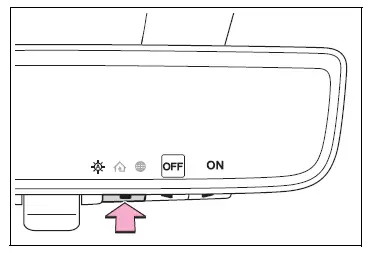
3. Press  or
 to
enable (ON)/disable (OFF) the automatic anti-glare function.
The icons will disappear if a button is not operated for approximately 5 seconds or more.
■Adjusting the display (digital mirror mode)
- If the displayed image is adjusted, it may appear distorted. This is not a malfunction.
- If the brightness of the Digital Rear-view Mirror is set too high, it may cause eye strain. Adjust the Digital Rear-view Mirror to an appropriate brightness. If your eyes become tired, change to optical mirror mode.
- The brightness of the Digital Rearview Mirror will change automatically according to the brightness of the area in front of your vehicle.
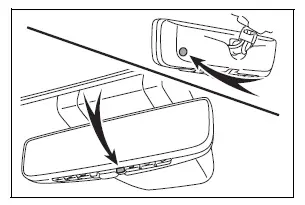
■To prevent the light sensors from malfunctioning
To prevent the light sensors from malfunctioning, do not touch or cover them
WARNING
Observe the following precautions.
Failure to do so may result in death or serious injury.
■While driving
- Do not adjust the position of the Digital Rear-view Mirror or adjust the display settings while driving.
Stop the vehicle and operate the Digital Rear-view Mirror control switches.
Failure to do so may cause a steering wheel operation error, resulting in an unexpected accident.
- Always pay attention to the vehicle's surroundings.
The size of the vehicles and other objects may look different when in digital mirror mode and optical mirror mode.
When backing up, make sure to directly check the safety of the area around your vehicle, especially behind the vehicle.
Additionally, if a vehicle approaches from the rear in the dark, such as at night, the surrounding area may appear dim.
■To prevent causes of fire
If the driver continues using the Digital Rear-view Mirror while smoke or odor comes from the mirror, it may result in fire. Stop using the system immediately and contact your Toyota dealer.
Test yourself
A quick Toyota RAV4 quiz: every answer comes with an explanation and a link to the manual page.