Customization
Customizable features
Your vehicle includes a variety of electronic features that can be personalized to suit your preferences. The settings of these features can be changed using the multi-information display, navigation/multimedia system, or at your Toyota dealer.
Customizing vehicle features
■ Changing using the Multimedia Display
1. Select  on the main menu.
2. Select "Vehicle customize" on the sub menu.
3. Select the item to change the settings of from the list.
Various setting can be changed.
Refer to the list of settings that can be changed for details.
For functions that can be turned on/off, select  (ON)/

(OFF).
The settings, such as the volume and sensor sensitivity can be changed by dragging the round icon on the display.
■ Changing using the multi-information display (with 7- inch display)
1. Press  or
 of the meter
control switches and select  .
2. Press  or
 of the meter
control switches, select the item.
3. To switch the function on and off, press  to switch to the
desired setting.
4. To perform detailed setting of functions that support detailed settings, press and hold  and display the setting
screen.
The method of performing detailed setting differs for each screen.
Please refer to the advice sentence displayed on the screen.
To go back to the previous screen or exit the customize mode, press  .
■ Changing using the multi-information display (with 12.3-inch display)
1. Press and hold  to display
the cursor on the content display area (center) of the multi-information display.
2. Press  or
 of the meter
control switches to select  and
press  .
3. Press  or
 of the meter
control switches, select the item.
4. To switch the function on and off, press  to switch to the
desired setting.
5. To perform detailed setting of functions that support detailed settings, press and hold and display the setting screen.
The method of performing detailed setting differs for each screen.
Please refer to the advice sentence displayed on the screen.
To go back to the previous screen or exit the customize mode, press  .
■When customizing using the navigation/multimedia system or multi-information display
Stop the vehicle in a safe place, apply the parking brake, and shift the shift lever to P. Also, to prevent battery discharge, leave the engine running while customizing the features.
WARNING
■During customization
As the engine needs to be operating during customization, ensure that the vehicle is parked in a place with adequate ventilation. In a closed area such as a garage, exhaust gases including harmful carbon monoxide (CO) may collect and enter the vehicle. This may lead to death or a serious health hazard.
NOTICE
■During customization
To prevent battery discharge, ensure that the engine is running while customizing features.
Customizable Features
Some function settings are changed simultaneously with other functions being customized. Contact your Toyota dealer for further details.
- Vehicles with navigation system or multimedia system: Settings that can be changed using the navigation system or multimedia system
- Settings that can be changed using the multi-information display
- Settings that can be changed by your Toyota dealer
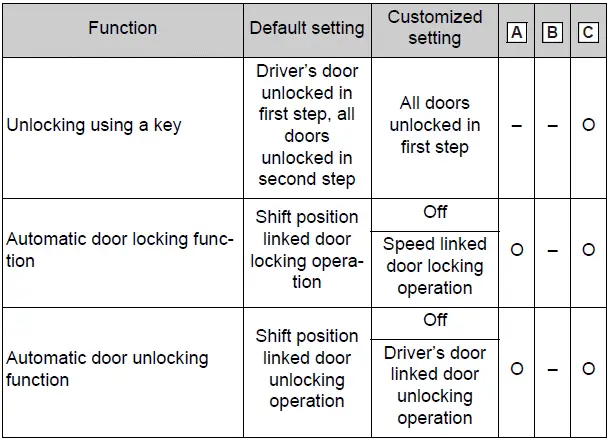
Definition of symbols: O = Available, - =Not available
■ Alarm*
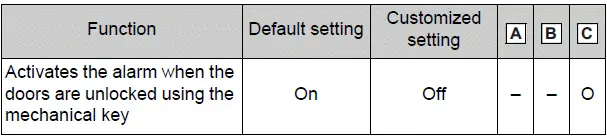
*: For Canada
■ Gauges, meters and multi-information display (with 7-inch display)
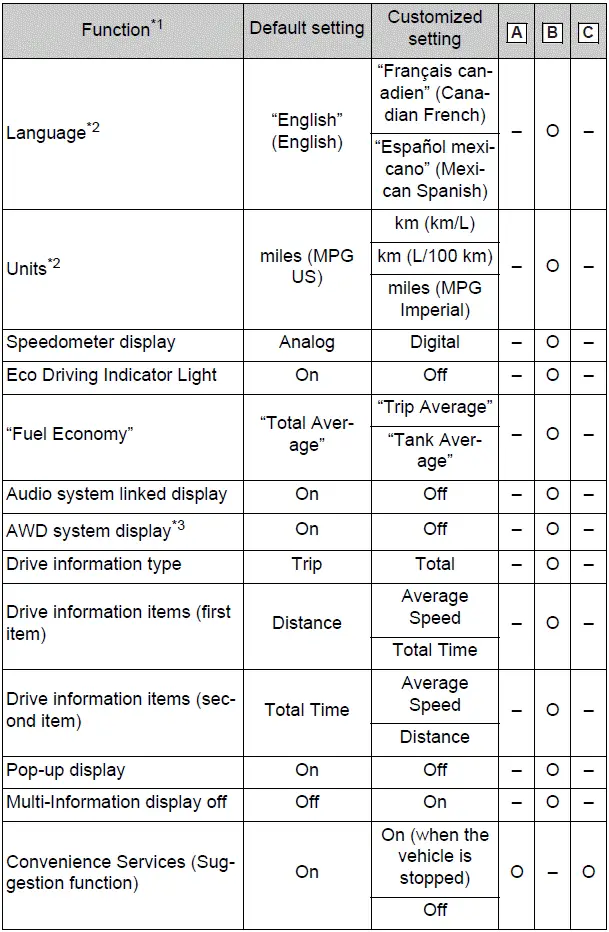
*1:For details about each function *2:The default setting varies according to country.
*3:AWD models only
■ Gauges, meters and multi-information display (with 12.3-inch display)
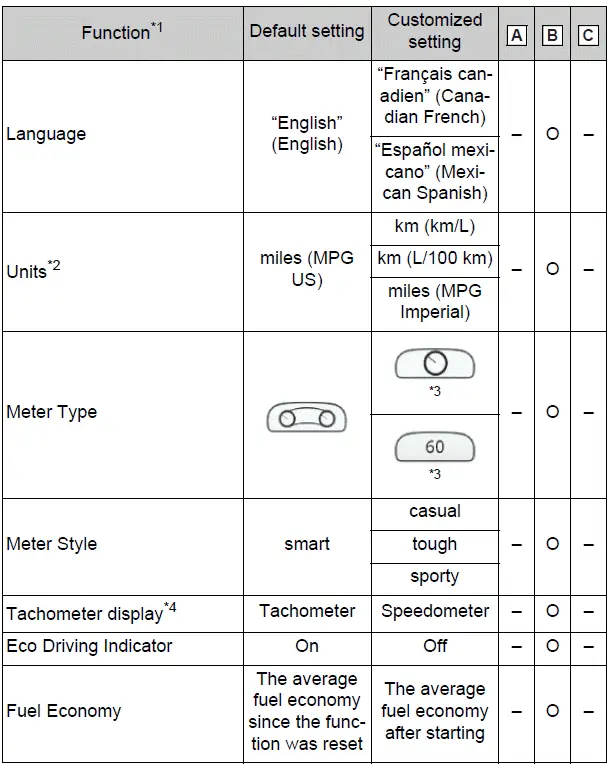

*1:For details about each function. *2:The default setting varies according to country. *3:The on/off operation of the widget can be changed. *4:The setting may not be changed depending on currently selected meter type.
*5:The same item cannot be displayed on the top row and bottom row.
■ Door lock
■ Rear seat reminder

■ Smart key system* and wireless remote control
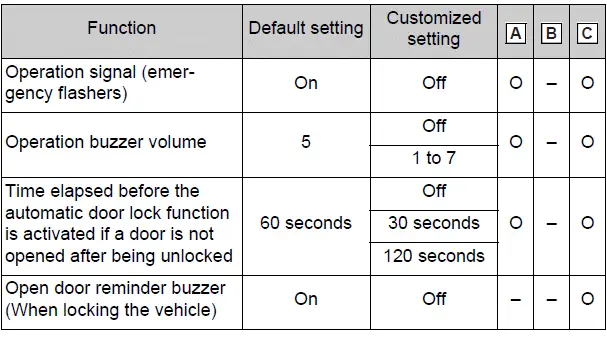
*: If equipped
■ Smart key system*1
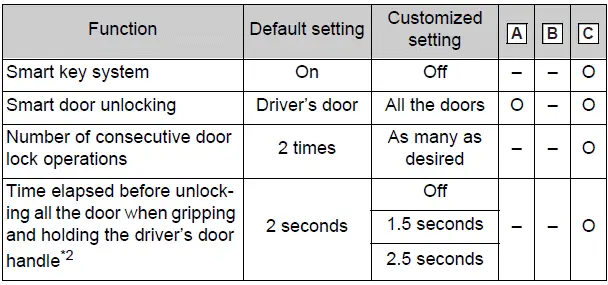
*1:If equipped
*2:This setting can be changed when the smart door unlocking setting is set to "Driver's door".
■ Wireless remote control
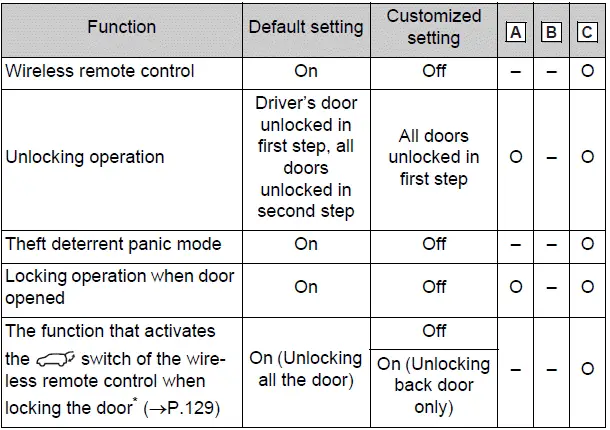
*: If equipped
■ Power back door*1
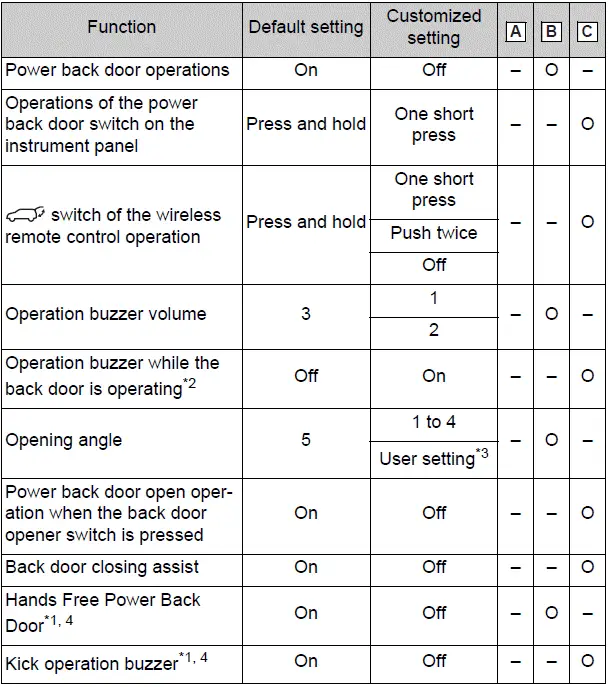
*1:If equipped
*2:The operation buzzer that sounds when the back door begins to operate cannot be turned off.
*3:The open position is set by the power back door switch. *4:When the towing hitch is installed, Hands Free Power Back Door does not work.
■ Driving position memory*
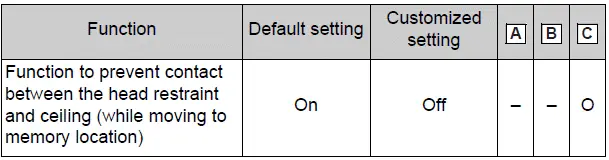
*: If equipped
■ Power windows, and moon roof* or panoramic moon roof*
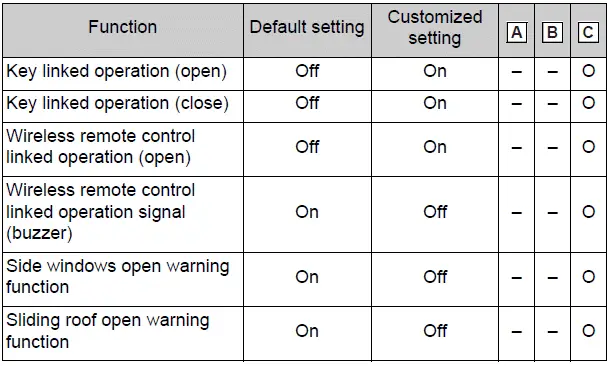
*: If equipped
■ Moon roof*

*: If equipped
■ Lights
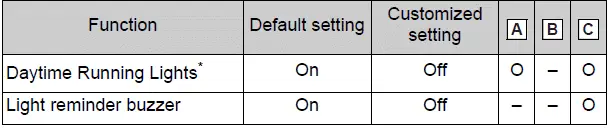
*: Except for Canada
■ Automatic light control system*
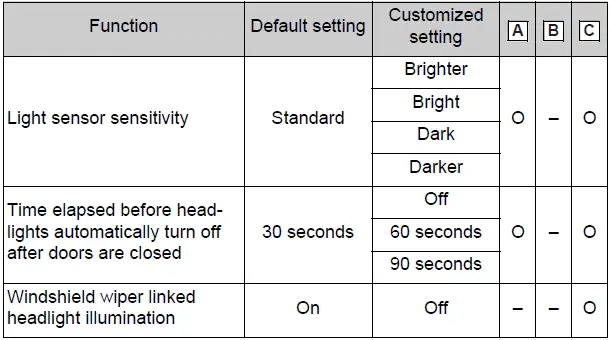
*: If equipped
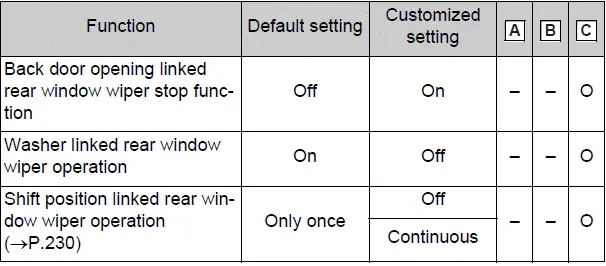
■ Rear window wiper
■ PCS (Pre-Collision System)

*: The system is automatically enabled each time the engine switch is turned to ON.
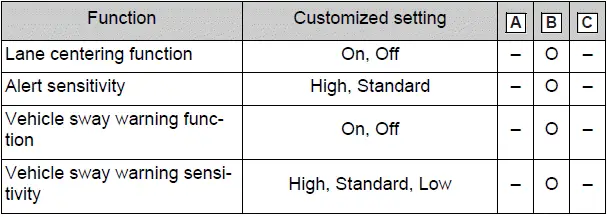
■ LTA (Lane Tracing Assist)
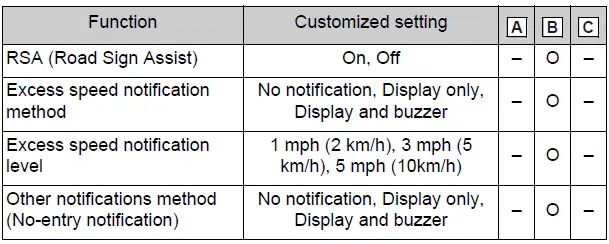
■ RSA (Road Sign Assist)*
*: If equipped
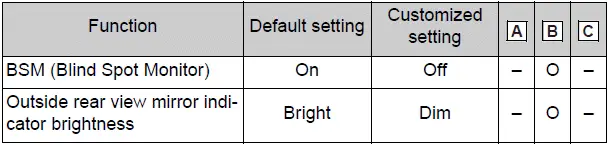
■ BSM (Blind Spot Monitor)*
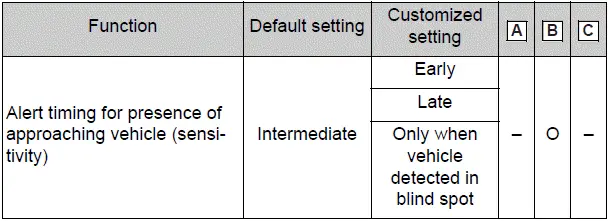
*: If equipped
■ RCTA (Rear Crossing Traffic Alert) function*1
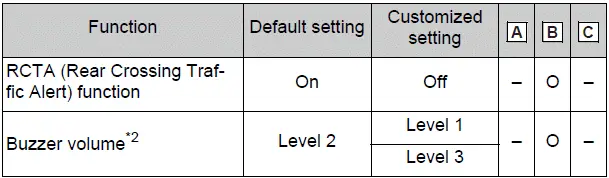
*1:If equipped
*2:This setting is linked with the buzzer volume of the intuitive parking assist.
■ Intuitive parking assist*1

*1:If equipped
*2:This setting is linked with the buzzer volume of the RCTA (Rear Crossing Traffic Alert) function.
■ PKSB (Parking Support Brake)*

*: If equipped
■ Stop & Start system*
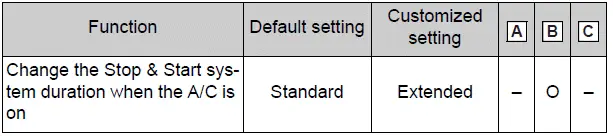
*: If equipped
■ Automatic air conditioning system*

*: If equipped
■ Illumination

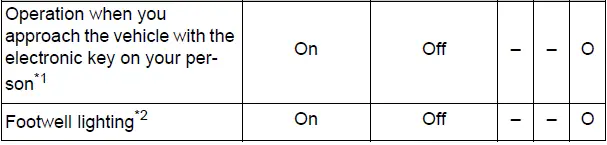
*1:Vehicles with smart key system only *2:If equipped
■Vehicle customization
- When the speed linked door locking function and shift position linked door locking function are both on, the door lock operates as follows.
- If the vehicle is started with all the doors locked, the speed linked door locking function would not operate.
- If the vehicle is started with any door unlocked, the speed linked door locking function will operate.
- When shifting the shift lever to any position other than P, all the doors will be locked.
- When the smart key system is off, the selecting door to unlock cannot be customized.
- When the doors remain closed after unlocking the doors and the automatic door lock function is activated, the signals will be generated in accordance with the Operation signal (buzzer) and the Operation signal (emergency flashers) settings.
Initialization
Items to initialize
The following items must be initialized for normal system operation after such cases as the battery being reconnected, or maintenance being performed on the vehicle:
List of the items to initialize
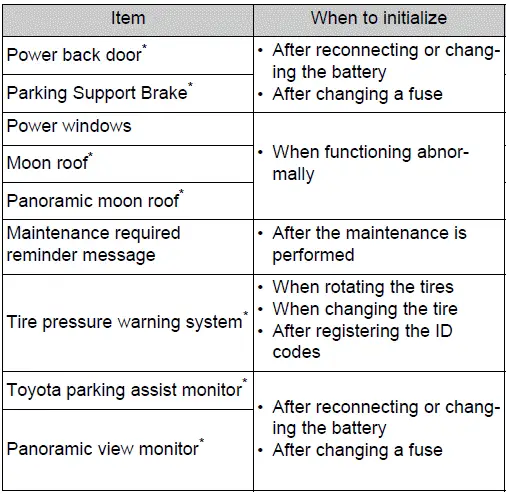
*: If equipped
Test yourself
A quick Toyota RAV4 quiz: every answer comes with an explanation and a link to the manual page.