Wireless remote control
The keys are equipped with the following wireless remote control:
Vehicles without smart key system
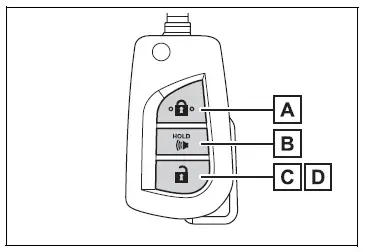
- Locks all the doors
- Sounds the alarm
- Unlocks all the doors
- Opens the side windows*
*: This setting must be customized at your Toyota dealer.
Vehicles with smart key system
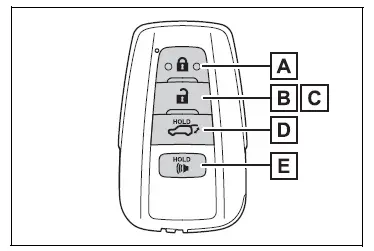
- Locks all the doors
- Unlocks all the doors
- Opens the side windows*1 and the moon roof*1, 2 or panoramic moon roof*1, 2
- Opens and closes the power back door*2
- Sounds the alarm
*2:If equipped
■Theft deterrent panic mode
Vehicles without smart key system
When  is pressed for longer
than about 1 second, an alarm will sound intermittently and the vehicle lights will flash to deter any person from trying to break into or damage your vehicle.
To stop the alarm, press any button on the key.
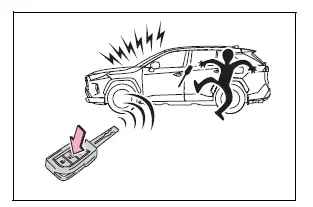
Vehicles with smart key system
When  is
pressed for longer than about 1 second, an alarm will sound intermittently and the vehicle lights will flash to deter any person from trying to break into or damage your vehicle.
To stop the alarm, press any button on the electronic key.

■Conditions affecting operation
Vehicles without smart key system
The wireless remote control function may not operate normally in the following situations.
- When the wireless key battery is depleted
- Near a TV tower, electric power plant, gas station, radio station, large display, airport or other facility that generates strong radio waves or electrical noise
- When carrying a portable radio, cellular phone or other wireless communication device
- When the wireless key is in contact with, or is covered by a metallic object
- When other wireless key (that emits radio waves) is being used nearby
- If window tint with a metallic content or metallic objects are attached to the rear window
Using the master key (vehicles without smart key system)

- Releasing
To release the key, press the button. - Folding
To stow the key back in its case, push the key back to the stowed position while pressing the button.
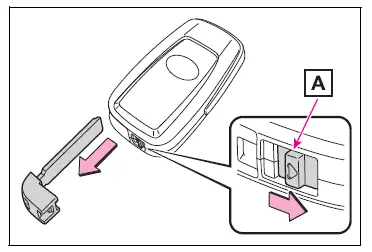
Using the mechanical key (vehicles with smart key system)
To take out the mechanical key, slide the release lever A and take the key out.
The mechanical key can only be inserted in one direction, as the key only has grooves on one side. If the key cannot be inserted in a lock cylinder, turn it over and re-attempt to insert it.
After using the mechanical key, store it in the electronic key. Carry the mechanical key together with the electronic key. If the electronic key battery is depleted or the entry function does not operate properly, you will need the mechanical key.
■When required to leave the vehicle's key with a parking attendant
Lock the glove box as circumstances demand.
Remove the mechanical key for your own use and provide the attendant with the electronic key only.
■If a wrong key is used
The key cylinder rotates freely to isolate inside mechanism.
Test yourself
A quick Toyota RAV4 quiz: every answer comes with an explanation and a link to the manual page.