Driving
Adjusting the set speed
In this manual: Driving
2steps
~12min
1/5difficulty
Done 0 of 2
To change the set speed, operate the lever until the desired set speed is displayed.
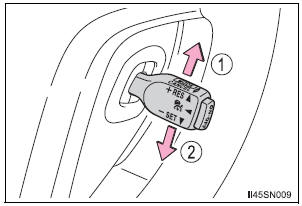
- Increases the speed
- Decreases the speed Fine adjustment: Momentarily move the lever in the desired direction.
Large adjustment: Hold the lever in the desired direction.
In the vehicle-to-vehicle distance control mode, the set speed will be increased or decreased as follows:
- • When the set speed is shown in “MPH” Fine adjustment: By approximately 1,6 km/h each time the lever is operated
Large adjustment: By approximately 8 km/h for each 0.75 seconds the lever is held - When the set speed is shown in “km/h” Fine adjustment: By approximately 1 km/h each time the lever is operated
Large adjustment: By approximately 5 km/h for each 0.75 seconds the lever is held
In the constant speed control mode , the set speed will be increased or decreased as follows: Fine adjustment: By approximately 1,6 km/h each time the lever is operated Large adjustment: The set speed can be increased or decreased continually until the lever is released.
Test yourself
A quick Toyota Sienna quiz: every answer comes with an explanation and a link to the manual page.
Was this page helpful?