Audio system
Detailed Bluetooth® system settings
In this manual: Audio system
13steps
~78min
3/5difficulty
Done 0 of 13
You can confirm and change the detailed Bluetooth® settings.
How to check and change detailed Bluetooth® settings
- Display the “Bluetooth* Setup” screen.
- Select “System Settings”.
- The following screen is displayed:
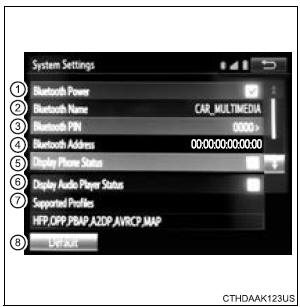
- Bluetooth* Power on/off You can change Bluetooth* function on/off
- Bluetooth* Name
- Change PIN-code
- Bluetooth* Address
- Display Phone Status Select to set the phone connection status display on/off.
- Display Audio Player Status Select to set the connection status display of the audio player on/off.
- Compatibility profile of the system
- Restore default settings
*: Bluetooth is a registered trademark of Bluetooth SIG, Inc.
Editing the Bluetooth* PIN
You can change the PIN-code that is used to register your Bluetooth® devices in the system.
- Select “Bluetooth* PIN”.
- Input a PIN-code, and select “OK”.
*: Bluetooth is a registered trademark of Bluetooth SIG, Inc.
Test yourself
A quick Toyota Sienna quiz: every answer comes with an explanation and a link to the manual page.
Was this page helpful?