Driving
Display
In this manual: Driving
5steps
~30min
2/5difficulty
Done 0 of 5
When the sensors detect an obstacle, the following displays inform the driver of the position and distance to the obstacle.
Multi-information display
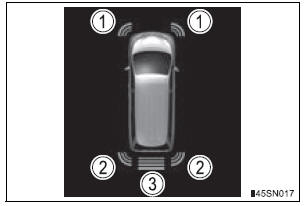
- Front corner sensor operation
- Rear corner sensor operation
- Rear center sensor operation
Audio system screen
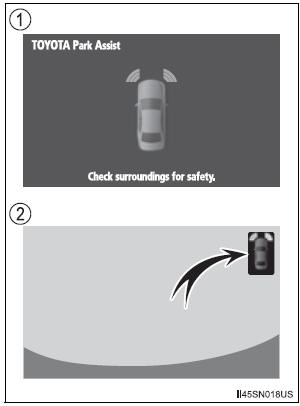
- Intuitive parking assist display When the rear view monitor system is not displayed.
A graphic is automatically displayed when an obstacle is detected. The screen can be set so that the graphic is not displayed.
- Insert display
When the rear view monitor system is displayed.A simplified image is displayed on the right upper corner of the audio system screen when an obstacle is detected.
Test yourself
A quick Toyota Sienna quiz: every answer comes with an explanation and a link to the manual page.
Was this page helpful?