Engine immobiliser
DTC check / clear
In this manual: Engine immobiliser
11steps
~66min
3/5difficulty
Done 0 of 11
1. CHECK DTC
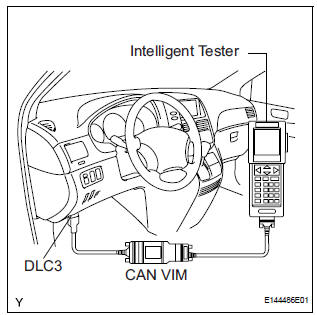
- Connect the intelligent tester to the Controller Area Network Vehicle Interface Module (CAN VIM). Then connect the CAN VIM to the DLC3.
- Turn the ignition switch on.
- Turn the tester ON.
- Enter the following menu items: DIAGNOSIS / OBD/ MOBD / IMMOBILISER / DTC INFO / CURRENT CODES.
- Check the DTC(s) and freeze frame data, and then write down.
- Check the details of the DTC(s).
2. CLEAR THE DTC
- Connect the intelligent tester (with CAN VIM) to the DLC3.
- Turn the ignition switch on.
- Turn the tester ON.
- Enter the following menu items: DIAGNOSIS / OBD/ MOBD / IMMOBILISER / DTC INFO / CLEAR CODES.
- Press the YES button.
Test yourself
A quick Toyota Sienna quiz: every answer comes with an explanation and a link to the manual page.
Was this page helpful?