Seat
System description
In this manual: Seat
47steps
~282min
4/5difficulty
Done 0 of 47
1. DESCRIPTION OF POWER REAR NO. 2 SEAT WITH STOWING FUNCTION
- A power rear no. 2 seat with stowing function has been adopted for the third-row seats.
- The power rear no. 2 seat with stowing function electrically stows and returns the seat when the power folding seat switch is operated.
- This system is adopted for both the left and right seats. Each system operates independently.
2. FUNCTIONS OF MAIN COMPONENTS
Components |
Function |
| Folding Motor (Cushion Position Sensor) | The fold seat control ECU provides the voltage that is used to operate the folding motor. The folding motor stows and returns the third-row seat. (A Hall type position sensor is installed in the folding motor to detect the seat cushion position.) |
| Reclining Motor (Seatback Position Sensor) | The fold seat control ECU provides the voltage that is used to operate the reclining motor. The reclining motor reclines the seatback of the third-row seat back and forth. (A Hall type position sensor is installed in the reclining motor to detect the seatback position.) |
| Release Actuator | The fold seat control ECU provides the voltage that releases the actuator that locks the seat leg. |
| Lock Switch | Turns off when the third-row seat leg is secured to the floor and sends a signal to the fold seat control ECU. |
| Fold Lock Switch | Turns off when the third-row seat cushion is stowed and sends a signal to the fold seat control ECU. |
| Power Rear No. 2 Seat Switch | Sends a seatback angle adjustment signal to the fold seat control ECU when this switch is operated. The seatback angle is adjusted based on this signal. |
| Fold Seat Switch | Sends a third-row seat folding-down, stowing, or return operation signal to the fold seat control ECU when this switch is operated. The third-row seat is folded down, stowed, or returned to the original position based on this signal. |
3. SYSTEM OPERATION
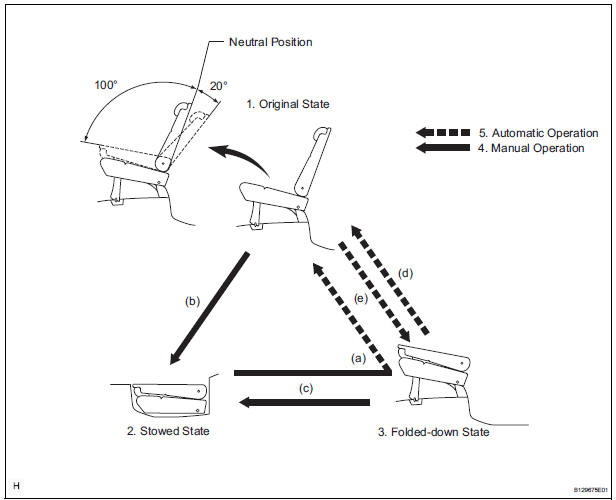
- Original State
- Stowed State
- Folded-down State
- Manual Operation (Press and hold the switch)
- Automatic Operation (Press and release the switch)
- Return operation (from the stowed state to the original state)
- Switch operation Push the stowing/return switch to the left and hold it to return the seat.
- Conditions
- The back door is open.
- The ignition switch is off or the shift lever is in the P position.
HINT:
- If the above conditions are not met, the indicator on the switch will blink while the switch is pressed.
- The buzzer will sound twice when the seat cushion return operation begins.
- After the seat cushion return operation is complete, the buzzer will sound twice to indicate that the seatback auto return operation has begun.
- If the switch is released, any other switch is pressed, or required conditions are no longer met midway through a return operation, the return operation will stop. The buzzer will sound for 10 seconds and the indicator on the switch will come on.
- If the system detects that an object is caught or detects that the motor is locked, the system will stop the seat operation, the indicator will blink, and the buzzer will sound for 10 seconds.
- The indicator will go off when normal operation resumes.
- Stowing operation (from the original state to the stowed state)
- Switch operation
Push the stowing/return switch to the right and hold it to stow the seat. - Conditions
- The back door is open.
- The ignition switch is off or the shift lever is in the P position.
HINT:
- The buzzer will sound twice when the seatback folding-down operation begins.
- If the switch is released, any other switch is pressed, or required conditions are no longer met midway through a stowing operation, the stowing operation will stop. The buzzer will sound for 10 seconds and the indicator on the switch will come on.
- If the system detects that an object is caught or detects that the motor is locked, the system will stop the seat operation, the indicator will blink, and the buzzer will sound for 10 seconds.
- The indicator will go off when normal operation resumes.
- The buzzer will sound twice when the operation is complete.
- Stowing operation (from the folded-down state to the stowed state)
- Switch operation
Push the stowing/return switch to the right and hold it to stow the seat. - Conditions
- The back door is open.
- The ignition switch is off or the shift lever is in the P position.
HINT:
- The buzzer will sound twice when the seat cushion stowing operation begins.
- If the switch is released, any other switch is pressed, or required conditions are no longer met midway through a stowing operation, the stowing operation will stop. The buzzer will sound for 10 seconds and the indicator on the switch will come on.
- If the system detects that an object is caught, the system will stop the seat operation, the indicator will blink, and the buzzer will sound for 10 seconds.
- The indicator will go off when normal operation resumes.
- The buzzer will sound twice when the operation is complete.
- Return operation (from the folded-down state to the original state)
- Switch operation
- Press and release the folding switch.
- Push the stowing/return switch to the left and release it.
- Press the power rear no. 2 seat switch to recline the seat back and release it.
- Conditions
- The back door is open.
- The ignition switch is off or the shift lever is in the P position.
- The seat cushion is secured.
HINT:
- The power rear no. 2 seat switch can be operated in the cabin to perform the return operation even while the vehicle is being driven.
- If any other switch is pressed midway through a return operation, the return operation will stop. The buzzer will sound for 10 seconds and the indicator on the switch will come on.
- If the system detects that an object is caught, the system will stop the return operation. The buzzer will sound for 10 seconds and the indicator on the switch will blink.
- The indicator will go off when normal operation resumes.
- Folding-down operation (from the original state to the folded-down state)
- Switch operation
Press and release the folding switch. - Conditions
- The back door is open.
- The ignition switch is off or the shift lever is in the P position.
- The seat cushion is secured.
HINT:
- If any switch other than the folding switch is pressed midway through a folding-down operation, the folding operation will stop. The buzzer will sound for 10 seconds and the indicator on the switch will come on.
- If the system detects that an object is caught, the system will stop the folding operation. The buzzer will sound for 10 seconds and the indicator on the switch will blink.
- The indicator will go off when normal operation resumes.
- Reclining operation
- Switch operation
Press the power rear no. 2 seat switch. - Conditions
- The seat cushion is secured.
- The seatback is within the reclining operation range.
HINT: The operation will stop when the power rear no.
2 seat switch is released or when the seatback position reaches either end of the reclining operation range.
3. SYSTEM OPERATION
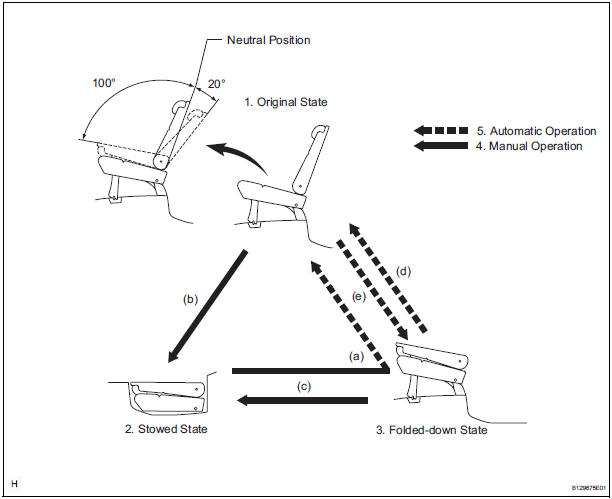
- Original State
- Stowed State
- Folded-down State
- Manual Operation (Press and hold the switch)
- Automatic Operation (Press and release the switch)
- Return operation (from the stowed state to the original state)
- Switch operation Push the stowing/return switch to the left and hold it to return the seat.
- Conditions
- The back door is open.
- The ignition switch is off or the shift lever is in the P position.
HINT:
- If the above conditions are not met, the indicator on the switch will blink while the switch is pressed.
- The buzzer will sound twice when the seat cushion return operation begins.
- After the seat cushion return operation is complete, the buzzer will sound twice to indicate that the seatback auto return operation has begun.
- If the switch is released, any other switch is pressed, or required conditions are no longer met midway through a return operation, the return operation will stop. The buzzer will sound for 10 seconds and the indicator on the switch will come on.
- If the system detects that an object is caught or detects that the motor is locked, the system will stop the seat operation, the indicator will blink, and the buzzer will sound for 10 seconds.
- The indicator will go off when normal operation resumes.
- Stowing operation (from the original state to the stowed state)
- Switch operation Push the stowing/return switch to the right and hold it to stow the seat.
- Conditions
- The back door is open.
- The ignition switch is off or the shift lever is in the P position.
HINT:
- The buzzer will sound twice when the seatback folding-down operation begins.
- If the switch is released, any other switch is pressed, or required conditions are no longer met midway through a stowing operation, the stowing operation will stop. The buzzer will sound for 10 seconds and the indicator on the switch will come on.
- If the system detects that an object is caught or detects that the motor is locked, the system will stop the seat operation, the indicator will blink, and the buzzer will sound for 10 seconds.
- The indicator will go off when normal operation resumes.
- The buzzer will sound twice when the operation is complete.
- Stowing operation (from the folded-down state to the stowed state)
- Switch operation Push the stowing/return switch to the right and hold it to stow the seat.
- Conditions
- The back door is open.
- The ignition switch is off or the shift lever is in the P position.
HINT:
- The buzzer will sound twice when the seat cushion stowing operation begins.
- If the switch is released, any other switch is pressed, or required conditions are no longer met midway through a stowing operation, the stowing operation will stop. The buzzer will sound for 10 seconds and the indicator on the switch will come on.
- If the system detects that an object is caught, the system will stop the seat operation, the indicator will blink, and the buzzer will sound for 10 seconds.
- The indicator will go off when normal operation resumes.
- The buzzer will sound twice when the operation is complete.
- Return operation (from the folded-down state to the original state)
- Switch operation
- Press and release the folding switch.
- Push the stowing/return switch to the left and release it.
- Press the power rear no. 2 seat switch to recline the seat back and release it.
- Conditions
- The back door is open.
- The ignition switch is off or the shift lever is in the P position.
- The seat cushion is secured.
HINT:
- The power rear no. 2 seat switch can be operated in the cabin to perform the return operation even while the vehicle is being driven.
- If any other switch is pressed midway through a return operation, the return operation will stop. The buzzer will sound for 10 seconds and the indicator on the switch will come on.
- If the system detects that an object is caught, the system will stop the return operation. The buzzer will sound for 10 seconds and the indicator on the switch will blink.
- The indicator will go off when normal operation resumes.
- Folding-down operation (from the original state to the folded-down state)
- Switch operation Press and release the folding switch.
- Conditions
- The back door is open.
- The ignition switch is off or the shift lever is in the P position.
- The seat cushion is secured.
HINT:
- If any switch other than the folding switch is pressed midway through a folding-down operation, the folding operation will stop. The buzzer will sound for 10 seconds and the indicator on the switch will come on.
- If the system detects that an object is caught, the system will stop the folding operation. The buzzer will sound for 10 seconds and the indicator on the switch will blink.
- The indicator will go off when normal operation resumes.
- Reclining operation
- Switch operation Press the power rear no. 2 seat switch.
- Conditions
- The seat cushion is secured.
- The seatback is within the reclining operation range.
HINT: The operation will stop when the power rear no.
2 seat switch is released or when the seatback position reaches either end of the reclining operation range.
Test yourself
A quick Toyota Sienna quiz: every answer comes with an explanation and a link to the manual page.
Was this page helpful?