Unlocking and locking the doors from the outside
Entry function (vehicles with a smart key system)
Carry the electronic key to enable this function.
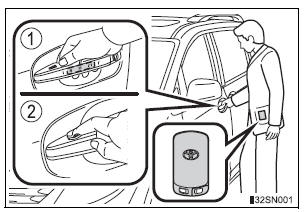
- Grip the driver’s door handle to unlock the door. Grip the passenger’s door handle to unlock all the doors.* Make sure to touch the sensor on the back of the handle.
The doors cannot be unlocked for 3 seconds after the doors are locked.
*: The door unlock settings can be changed.
- Touch the lock sensor (the indentation on the upper part of the door handle) to lock all the doors.
Check that the door is securely locked.
Wireless remote control
- Vehicles without a smart key system (type A)
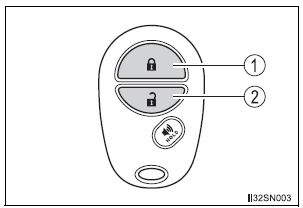
- Locks all doors
Check that the door is securely locked. - Unlocks all doors
Pressing the button unlocks the driver’s side doors. Pressing the button again within 3 seconds unlocks the other doors.
- Vehicles without a smart key system (type B)

- Locks all doors
Check that the door is securely locked. - Unlocks all doors
Pressing the button unlocks the driver’s side doors. Pressing the button again within 3 seconds unlocks the other doors.
- Vehicles with a smart key system
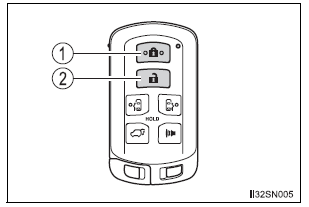
- Locks all doors
Check that the door is securely locked. - Unlocks all doors
Pressing the button unlocks the driver’s side doors. Pressing the button again within 3 seconds unlocks the other doors.
Key
- Vehicles without a smart key system
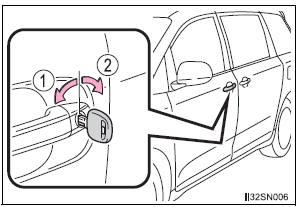
- Locks all the doors
- Unlocks all the doors
Turning the key unlocks the driver’s side doors. Turning the key again within 3 seconds unlocks the other doors.
- Vehicles with a smart key system
The doors can also be locked and unlocked with the mechanical key.
Operation signals
A buzzer sounds and the emergency flashers flash to indicate that the doors have been locked/unlocked. (Locked: Once; Unlocked: Twice)
Security feature
If a door is not opened within approximately 60 seconds after the vehicle is unlocked, the security feature automatically locks the vehicle again.
When the door cannot be locked by the lock sensor on the upper part of the front door handle

Touch both lock sensors on the upper and lower part of the front door handle simultaneously.
Door lock buzzer
If an attempt to lock the doors (except for power sliding doors or power back door) is made when a door is not fully closed, a buzzer sounds continuously.
Fully close the door to stop the buzzer, and lock the vehicle once more.
Alarm (if equipped)
Using the wireless remote control to lock the doors will set the alarm system.
If the smart key system or the wireless remote control does not operate properly
Vehicles with a smart key system: Use the mechanical key to lock and unlock the doors. Replace the key battery with a new one if it is depleted
Test yourself
A quick Toyota Sienna quiz: every answer comes with an explanation and a link to the manual page.