Audio system
Using the voice command system
In this manual: Audio system
3steps
~18min
2/5difficulty
Done 0 of 3
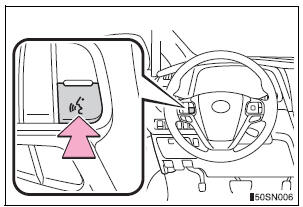
- Press the talk switch.

- Select to train voice recognition.
- Select to start the voice recognition tutorial.
- Select “OK” and say the desired command. On the list screen, you can select the desired command.
To cancel the voice command system, press and hold the talk switch.
Microphone
When using the microphone
- It is unnecessary to speak directly into the microphone when giving a command.
- When “Voice Prompt Interrupt” set to on, it is not necessary to wait for the confirmation beep before speaking a command.
- Voice commands may not be recognized if:
- Spoken too quickly.
- Spoken at a low or high volume.
- The roof or windows are open.
- Passengers are talking while voice commands are spoken.
- The air conditioning speed is set high.
- The air conditioning vents are turned towards the microphone.
- In the following conditions, the system may not recognize the command properly and using voice commands may not be possible:
- The command is incorrect or unclear. Note that certain words, accents or speech patterns may be difficult for the system to recognize.
- There is excessive background noise, such as wind noise.
Test yourself
A quick Toyota Sienna quiz: every answer comes with an explanation and a link to the manual page.
Was this page helpful?