Interior and exterior features
Listening to Bluetooth® audio
In this manual: Interior and exterior features
~1min read
The Bluetooth® audio system enables the user to enjoy music played on a portable player from the vehicle speakers via wireless communication.
Select “ Audio” on the “Select Audio Source” screen.When a Bluetooth® device cannot be connected, check the connection status on the “Bluetooth Audio” screen. If the device is not connected, either register or reconnect the device.
Audio control screenSome titles and controls may not be displayed depending on the type of portable audio player used.
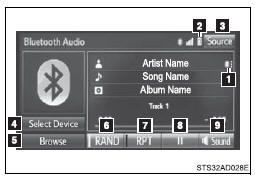
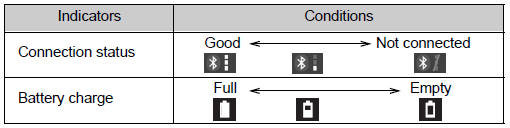
 Connection status
 Battery charge
 “Select Audio Source” screen appears
 Selecting a Bluetooth® device
 Select to display the play mode selection screen
 Random playback
 Repeat play
 Pause
Select  to resume play
 Setting the sound
Test yourself
A quick Toyota Tacoma quiz: every answer comes with an explanation and a link to the manual page.
Was this page helpful?