While driving
Display and indicator lamps
In this manual: While driving
4steps
~24min
2/5difficulty
Done 0 of 4
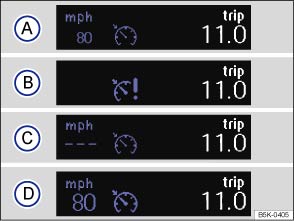
Fig. 160 Instrument cluster display: cruise control (CCS) status display
 First read and observe the introductory information and safety warnings
CCS displays
Status :
 CCS switched off temporarily. The stored speed is shown in small numbers or displayed in a darker shade.
 System fault. Proceed to a qualified workshop.
 CCS switched on. Speed memory is empty.
 CCS is active. Stored speed in large figures.
Indicator lamp
| Lit up | Possible cause |
|---|---|
 |
CCS or the speed limiter is controlling the speed. |
Several warning and indicator lamps will light up briefly as a functional check when the ignition is switched on. They will switch off after a few seconds.
 Failure to observe illuminated warning lamps and text messages can lead to your vehicle breaking down in traffic, and can cause accident and serious injury.
- Never ignore any illuminated warning lamps or text messages.

 NOTICE
Failure to observe illuminated indicator lamps and text messages can lead to your vehicle being damaged. 
Test yourself
A quick Volkswagen Golf quiz: every answer comes with an explanation and a link to the manual page.
Was this page helpful?