While driving
Display and warning and indicator lamp
In this manual: While driving
3steps
~18min
3/5difficulty
Done 0 of 3
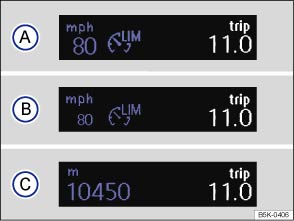
Fig. 163 In the instrument cluster display: speed limiter status displays
 First read and observe the introductory information and safety warnings
Speed limiter displays
Status :
 The speed limiter is active. The last stored speed is displayed in large digits.
 The speed limiter is inactive. The last stored speed is shown in small digits or the display is darkened.
 The speed limiter is switched off. The total mileage is displayed.
| Lights up or flashes | Possible cause |
|---|---|
 |
Lit up: the speed limiter is switched on, active. |
| Flashing: the set speed of the speed limiter has been exceeded. |
Several warning and indicator lamps will light up briefly as a functional check when the ignition is switched on. They will switch off after a few seconds.
 Failure to observe illuminated warning lamps and text messages can lead to your vehicle breaking down in traffic, and can cause accident and serious injury.
- Never ignore any illuminated warning lamps or text messages.

 NOTICE
Failure to observe illuminated indicator lamps and text messages can lead to your vehicle being damaged. 
Test yourself
A quick Volkswagen Golf quiz: every answer comes with an explanation and a link to the manual page.
Was this page helpful?