Instrument cluster
Using the menus in the instrument cluster
In this manual: Instrument cluster
~2min read
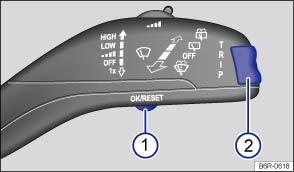
Fig. 13 Vehicles without multifunction steering wheel: press button ① in the windscreen wiper lever to confirm the menu point and rocker switch ② to change the menu
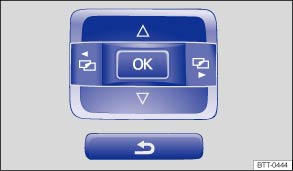
Fig. 14 Vehicles with multifunction steering wheel: control buttons for menus in the instrument cluster
 First read and observe the introductory information and safety warnings
Calling up the main menu
- Switch on the ignition.
- If a message or vehicle pictogram is being displayed, press button on the windscreen wiper level or the

 button on the multifunction steering wheel .
- When operated using the windscreen wiper lever: press and hold the rocker switch to display the main menu or to return to the main menu from another menu.
- When operated using the multifunction steering wheel: the main menu is not listed. To navigate through the individual menu options, press the
 or
 button several times .
Opening a submenu
- Press the rocker switch on the windscreen wiper lever up or down, or press the arrow buttons
 or
 on the multifunction steering wheel until the required menu option is selected.
- The selected menu option is located between the two horizontal lines. There is also a triangle on the right-hand side:
 .
- To open the submenu, press button on the windscreen wiper lever, or press the button on the multifunction steering wheel .
Making settings in the menu
- Make any desired changes using the rocker switch on the windscreen wiper lever or the arrow buttons on the multifunction steering wheel. If necessary, press and hold the controls to increase or decrease the values quickly.
- Mark and confirm your selection by pressing the button on the windscreen wiper lever, or by pressing the button on the multifunction steering wheel.
Returning to the main menu
- Within the menu: in the submenu, select the Back menu option to leave the submenu.
- When operated using the windscreen wiper lever: press and hold the rocker switch .
- When operated using the multifunction steering wheel: press the
 button .
Test yourself
A quick Volkswagen Polo quiz: every answer comes with an explanation and a link to the manual page.
Was this page helpful?