Lights and vision
Windscreen wiper lever
In this manual: Lights and vision
~2min read
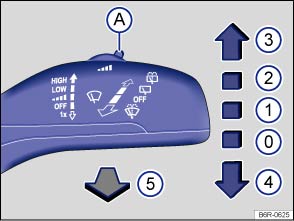
Fig. 72 Operating the front windscreen wiper
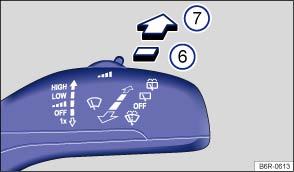
Fig. 73 Operating the rear window wiper
 First read and observe the introductory information and safety warnings
| Move the windscreen wiper lever to the desired position : | ||
|---|---|---|
| ⓪ |   |
Switches off the windscreen wiper. |
| ① |  |
Interval wipe for the windscreen. |
| Set the interval lengths with the switch (vehicles without a rain/light sensor) or adjust the sensitivity of the rain/light sensor. | ||
| ② |   |
Slow wipe. |
| ③ |    |
Fast wipe. |
| ④ |   |
Flick wipe – wipes briefly. Push and hold the windscreen wiper lever down for longer to wipe more quickly. |
| ⑤ |  |
Pulling the windscreen wiper lever activates the wash and wipe system for cleaning the windscreen. |
| ⑥ |  |
Interval wipe for the rear window. The windscreen wiper will wipe the window approximately every 6 seconds. |
| ⑦ |  |
Pushing the windscreen wiper lever activates the wash and wipe system for cleaning the rear window. |

 NOTICE
If the ignition is switched off while the windscreen wiper is switched on, the windscreen wiper will continue to wipe on the same setting when the ignition is switched on again. Frost, snow and other obstructions on the windscreen can cause damage to the windscreen wipers and wiper motor. - Remove any snow and ice from the wipers and the windows before setting off.
- Carefully loosen wiper blades that have become frozen onto the windscreen. Volkswagen recommends using a de-icer spray for this.
NOTICE
Do not switch on the windscreen wipers when the window is dry. Using the wiper blades when the rear windscreen is dry could cause damage to the rear windscreen. 
Test yourself
A quick Volkswagen Polo quiz: every answer comes with an explanation and a link to the manual page.
Was this page helpful?