Vehicle overview
Driver side overview
In this manual: Vehicle overview
13steps
~78min
3/5difficulty
Done 0 of 13
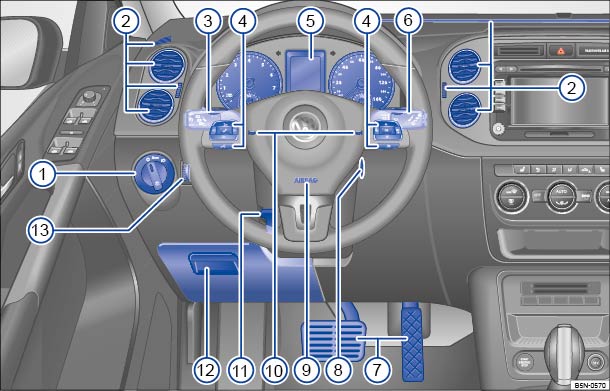
Fig. 5 Driver side overview.
Key to ⇒ Fig. 5 :

Headlight switch
 ⇒ Lights
- Off position -
 -
- Automatic headlight control -


 -
- Low beams

- Fog lights

- Off position -
 Air vents ⇒ Climate control

Lever for ⇒ Lights
- High beams
- Headlight flasher
 1x
- Turn signal

- Cruise Control System (CSS)
 –


 –
 –


 –
 ⇒ Cruise control system (CCS)
- High beams

Multi-function steering wheel controls ⇒ Volkswagen Information System
- Volume setting for radio programs, navigation system notifications, or telephone calls
 –

- Mute switching for radio or activation of voice control

- Display Phone main menu or accept telephone calls

- Audio, Navigation


- Control switches for the Volkswagen Information System (Premium version)
 –
 –
 –
 –
 –

- Volume setting for radio programs, navigation system notifications, or telephone calls

Instrument cluster:
- Instruments ⇒ . ⇒ .
- Display ⇒ . ⇒ .
- Warning and indicator lights ⇒ Warning and indicator lights .

Windshield wiper and washer lever ⇒ Windshield wiper and washer
- Windshield wiper


 –

- Intermittent operation for windshield wipers

- One-tap wiping
 x
- Windshield wiper

- Automatic wipe/wash for windshield

- Rear window wiper

- Automatic wipe/wash for rear window

- Lever with buttons for the Volkswagen Information System (Basic version)
 – /⇒ Volkswagen Information System
- Windshield wiper
 Pedals ⇒ Shifting
 Ignition switch ⇒ Starting and stopping the engine
 Driver front airbag ⇒ Airbag system
 Horn (only works when the ignition is switched on)
 Lever for adjustable steering wheel ⇒ Adjusting the seating position
 Storage compartment ⇒ Storage areas
 Dimmer control for the instrument and switch illumination
 ⇒ Lights
Test yourself
A quick Volkswagen Tiguan quiz: every answer comes with an explanation and a link to the manual page.
Was this page helpful?