Turn signal lever and high beam switch
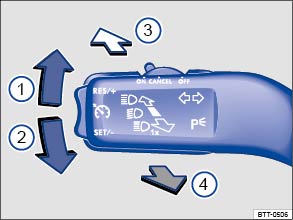
Fig. 81 Turn signal lever and high beam switch.
 Read and follow the introductory information and safety information first⇒
 Introduction to the subject
Move the lever to the desired position.
 Right turn signal.
 Left turn signal.
 Switching high beams on ⇒ An indicator light
 comes on in the instrument cluster when the high beams are switched on.
 Switching the high beams off and operating the headlight flasher: The headlight flasher turns on the high beams as long as the lever is pulled and manually held in the pulled position. The indicator light lights up. When released, the lever moves back to the home position and turns off the high beams. The indicator light goes out.
Move the lever back to the home position to turn the feature off
Lane changing feature (comfort turn signal)
To use the lane change signaling feature, move the lever up or down slightly, just to the point of resistance and then release it. If you have lane change flash (Ln. chg. flash) switched on, the turn signals and the turn signal indicator flash 3 times. If it is switched off, they flash as long as you hold the lever up or down, and go out when you release the lever.
Lane change flash is switched on and off in the Lights & Vision menu in the instrument cluster display ⇒ Volkswagen Information System . If your vehicle is not equipped with the Lights & Vision menu, the feature can be deactivated by an authorized Volkswagen dealer or authorized Volkswagen Service Facility.
 Improper use of high beams can cause distract and blind others, causing accidents and serious injuries.

Test yourself
A quick Volkswagen Tiguan quiz: every answer comes with an explanation and a link to the manual page.