Overview of the vehicle
Button for the driver assist systems
In this manual: Overview of the vehicle
~1min read
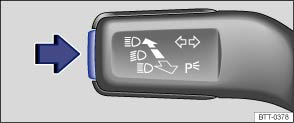
Fig. 14 On the turn signal and main beam lever: button for driver assist systems
 First read and observe the introductory information and safety warnings
You can switch the driver assist systems listed in the Assistant menu on and off with the button on the turn signal and main beam lever .
Switching individual driver assist systems on or off
- Briefly press the button (arrow) to call up the Assistant menu.
- Select the driver assist system and switch it on or off . A tick indicates when a driver assist system is switched on.
- Then confirm the selection by pressing OK.
Switching all driver assist systems on or off
- Press the button (arrow) for longer than one second to switch all the driver assist systems that are selected in the Assistant menu on or off at the same time.
- All driver assist systems will be switched on if none of the driver assist systems in the Assistant menu were active.
Test yourself
A quick Volkswagen Touran quiz: every answer comes with an explanation and a link to the manual page.
Was this page helpful?