Instrument overview
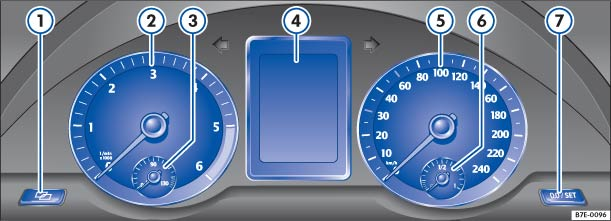
Fig. 11 Instrument cluster in the dash panel
 First read and observe the introductory information and safety warnings
Descriptions of the instruments :

Setting button for the clock 1)
- Press the button
 to mark either the hours or minutes display.
- Press the button 0.0 / SET to set the time . Press and hold to scroll through the minutes quickly.
- Press button again to finish setting the clock.
- Press the button

Rev. counter (revolutions x 1000 per minute of running engine).
The start of the red zone on the dial indicates the maximum engine speed which may be used in each gear when the engine is warm and after it has been run in properly. You should change up a gear or move the selector lever to D (or lift your foot off the accelerator) before the needle reaches the red zone .
 Engine coolant temperature display
 or Natural gas fuel tank display in vehicles with natural gas engine .
 Displays .
 Speedometer
 Fuel gauge .

Reset button for the trip recorder display (trip).
- Press 0.0 / SET button to reset to zero.

 NOTICE
- When the engine is cold, avoid high engine speeds, driving at full throttle and over-loading the engine.
- In order to avoid damage to the engine, the pointer on the rev counter may only briefly point into the red area.

Changing up a gear early will help to save fuel and minimise engine noise.
1) In some equipment levels, clock settings are made using the Settings menu on the instrument cluster display .
Test yourself
A quick Volkswagen Touran quiz: every answer comes with an explanation and a link to the manual page.