Locking and unlocking the vehicle from outside
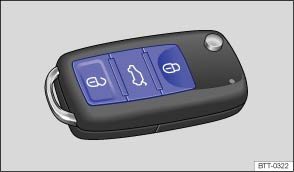
Fig. 22 Buttons in the vehicle key
 First read and observe the introductory information and safety warnings
| Function | Buttons to be used in the vehicle key | Action carried out with key in the lock cylinder Remove the cover of the lock cylinder if necessary . |
|---|---|---|
| Unlocks the vehicle. | Press  button. Press and hold for convenience opening. |
Insert the vehicle key in the driver door lock cylinder and turn anti-clockwise. Turn and hold for convenience opening. |
| Locks the vehicle. | Press  button. Press and hold for convenience closing. |
Insert the vehicle key in the driver door lock cylinder and turn clockwise. Turn and hold for convenience closing. |
| Unlocks the tailgate. | Press  button. |
Insert the vehicle key in the driver door lock cylinder and turn anti-clockwise. |
Please note: depending on the settings made for the central locking system in the Convenience sub-menu, all of the doors and the tailgate may only be unlocked once the button has been pressed twice .
The vehicle key will lock and unlock the vehicle only when the battery has enough power and the key is located within a few metres of the vehicle.
- When vehicle is locked, all turn signals will flash once as confirmation.
- When vehicle is unlocked, all turn signals will flash twice as confirmation.
If the turn signals do not flash as confirmation, at least one of the doors, the tailgate or the bonnet is not locked.
The vehicle cannot be locked using the vehicle key if the driver door is still open. The vehicle will be locked again if you do not open one of the doors or the tailgate within a few seconds automatically after unlocking the car. This function prevents the vehicle from remaining unlocked if the unlocking button is pressed by mistake.
Convenience opening and closing
- See electric windows – functions .
- See panorama sliding roof – function .
Test yourself
A quick Volkswagen Touran quiz: every answer comes with an explanation and a link to the manual page.