Overview of the vehicle
Overview of the driver side
In this manual: Overview of the vehicle
16steps
~96min
4/5difficulty
Done 0 of 16
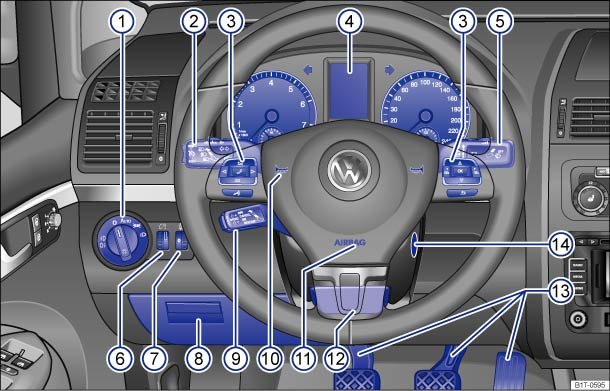
Fig. 5 Overview of the driver side (left-hand drive vehicles)
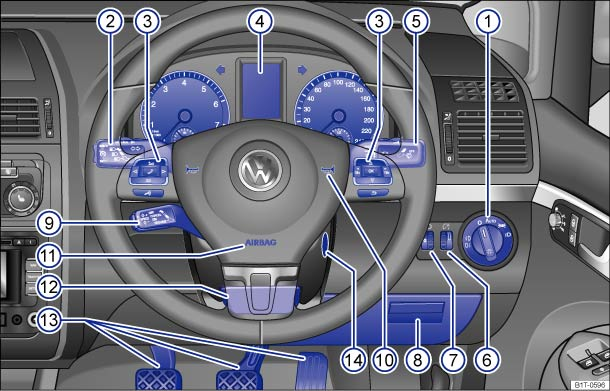
Fig. 6 Overview of the driver side (right-hand drive vehicles)
Key for and :
- Vent


- Button for interior monitor


Light switch

- Light switched off --
- Automatic headlight control -


 -
- Side light and dipped beam


- Fog lights


- Light switched off -

Lever for
- Main beam headlights

- Headlight flasher
- Turn signal

- Parking lights

- the cruise control system (CCS) –


 – –


 / -

 - / - -
- Button for the driver assist systems
- Main beam headlights

Controls on the multi-function steering wheel:
- Volume setting for the radio, navigation announcements or a telephone conversation
 –

- Mute function for the radio or activating the voice control system

- Opening the telephone main menu or accepting a telephone call

- Control buttons for the Volkswagen information system


 ,
 ,

- Volume setting for the radio, navigation announcements or a telephone conversation

Instrument cluster:
- Instruments
- Display
- Warning lamps and indicator lamps

Lever for windscreen wipers and washers
- Windscreen wipers


 –

- Interval wipe for the windscreen

- Flick wipe
 x
- Windscreen wiper

- Wash and wipe system for the windscreen

- Rear wiper

- Wash and wipe system for the rear window

- Control lever with buttons for the Volkswagen information system - , / .
- Windscreen wipers
 Brightness control for instrument and switch illumination

 Headlight range control

 Stowage compartment
 Lever for the cruise control system (CCS) – – – / - - / - -
 Horn (works only when the ignition is on)
 Driver front airbag
 Lever for adjustable steering column
 Pedals
 Ignition lock
Test yourself
A quick Volkswagen Touran quiz: every answer comes with an explanation and a link to the manual page.
Was this page helpful?