While driving
Parking
In this manual: While driving
~1min read
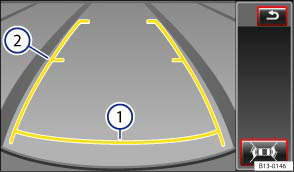
Fig. 151 On the screen: static orientation lines for the parking space behind the vehicle
 First read and observe the introductory information and safety warnings
Overview of the orientation aid
| Colour | Meaning of the orientation lines on the screen a) |
|---|---|
| ①, yellow | Safety distance: area up to about 40 cm on the road behind the vehicle. |
| ②, yellow | Projection of the vehicle (widened somewhat) toward the rear. The middle markers are approximately one metre behind the vehicle on the pavement. The area displayed ends approximately two metres behind the vehicle on the pavement. |
Parking
- Position the vehicle in front of a parking space and engage the reverse gear.
- Reverse slowly and steer the vehicle so that the yellow orientation lines lead into the parking space .
- Drive the vehicle into the parking space so that the yellow orientation lines are parallel to the parking space.
a) All distances of the orientation lines refer to a vehicle on a horizontal surface.
Test yourself
A quick Volkswagen Touran quiz: every answer comes with an explanation and a link to the manual page.
Was this page helpful?