Locking or unlocking the vehicle from outside
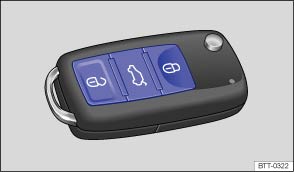 Fig. 15
Buttons on the vehicle key.
 Fig. 16
Mechanical vehicle key.
 Read and observe the introductory information
and safety warnings first⇒
 Introduction to
With the vehicle key
| Function | Action with the buttons on the vehicle key ⇒ Fig. 15 | Action with vehicle key in the lock cylinder ⇒ Fig. 15 or ⇒ Fig. 16 |
|---|---|---|
| Unlock the vehicle. | Button Press. | Insert the vehicle key into the driver's door lock cylinder and turn counterclockwise. |
| Lock the vehicle. | Button Press the button. On vehicles with Safe lock button Press once to lock the vehicle with Safe lock ⇒ Safe lock . button Press twice to lock the vehicle without Safe lock. |
Insert the vehicle key into the driver's door lock cylinder and turn clockwise. |
| Unlock the tailgate. | Button Press ⇒ Tailgate . | Insert the vehicle key into the driver's door lock cylinder and turn counterclockwise. |
Note: Depending on how the central locking has been set up by a specialist workshop, the button must be pressed twiceto unlock all doors and the tailgate.
The vehicle key locks and unlocks the vehicle only if the coin cell battery has sufficient power and the vehicle key is within a few meters of the vehicle.
- When locking the vehicle, all turn signals flash once to confirm.
- When unlocking the vehicle, all turn signals flash twice to confirm.
If the turn signals do not flash to confirm locking, at least one of the doors or the tailgate is not closed.
The vehicle cannot be locked with the vehicle key while the driver's door is open. If the vehicle is unlocked and no door or the tailgate is opened, the vehicle locks again automatically after a few seconds. This function prevents the vehicle from being left unlocked unintentionally.

On vehicles without central locking, locking or unlocking the front passenger door has no effect on the interior light ⇒ Lights .