Setting a time interval

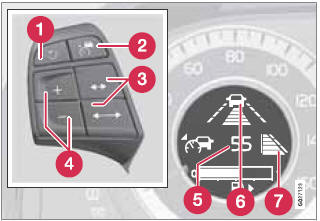
Controls and display
3 Time interval: Increase/decrease
6 Time interval: On, while it is being set
7 Time interval: On, after it has been set
Press  to increase the interval or
 to decrease it.

Five different time intervals can be selected and are shown in the display as 1–5 horizontal bars. The greater the number of bars, the longer the time interval. One bar represents approximately 1 second to the vehicle ahead; 5 bars is approximately 2.5 seconds.

The number of bars indicating the selected time interval are shown while the setting is being made and for several seconds afterward. A smaller version of the symbol is then shown to the right in the display.
The same symbol is displayed when Adaptive Cruise Control (ACC) is activated.
Test yourself
A quick Volvo XC60 quiz: every answer comes with an explanation and a link to the manual page.