Remote control

The remote control included with the Rear Seat Entertainment system (RSE)* can be used to control all of the infotainment system's functions.
Welding ShopTo use the remote, begin by pressing its  button to select a screen (L: left rear screen, F: front screen, or R: right rear screen).
Continue by pointing the remote toward the selected rear screen's IR transceiver (see the illustration on page 245) or to the front screen's IR transceiver located to the right of the INFO button on the center console (see page 211 for the location of this button).
To control one of the rear RSE screens, select L (left)/R (right) using the remote's button.
Continue by pointing the remote at the selected screen's IR transceiver (see the illustration on page 245 for its location).
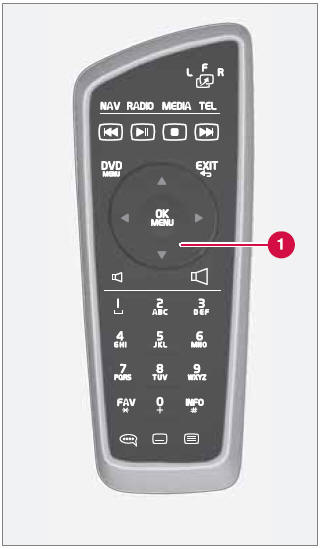
1 The scroll wheel has the same function as TUNE in the center console control panel.
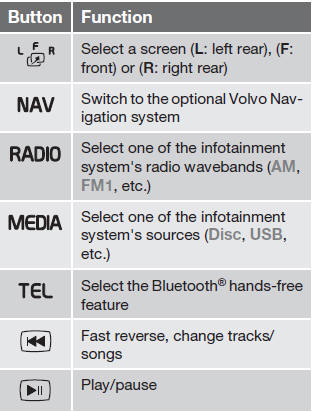
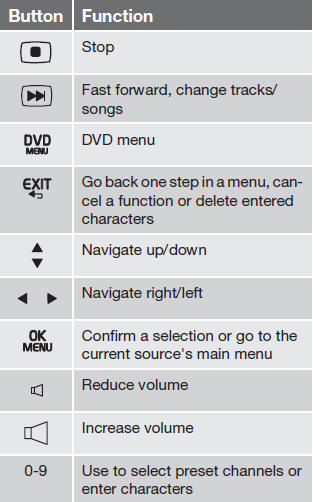
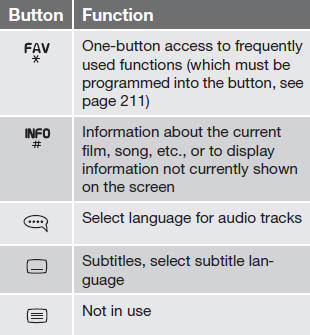
Replacing batteries
The remote control runs on four AA/LR6 batteries.
It is advisable to have extra batteries on long trips.
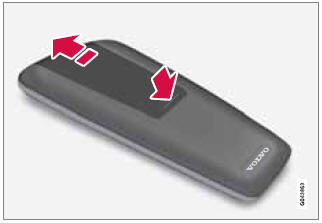
1. Press down on the battery cover and slide it in the direction indicated in the illustration.
2. Remove the old batteries and insert new ones in the directions indicated by the symbols in the battery holder.
3. Slide the cover back into place.
Worn out batteries should be disposed of in an environmentally responsible manner.
Test yourself
A quick Volvo XC60 quiz: every answer comes with an explanation and a link to the manual page.