Main instrument panel

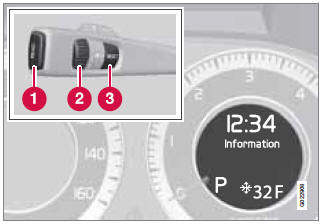
Information display and menu controls
1 - READ – access to the list of messages and message confirmation.
2 - Thumbwheel – browse among menus and options in the list of functions.
3 - RESET – reset the active function. Used in certain cases to select/activate a function, see the explanation under each respective function.
The menus shown on the information displays in the instrument panel are controlled with the left lever. The menus shown depend on ignition mode. Press READ to erase a message and return to the menus.
Menu overview
Driving distance on current fuel reserve
Average
Instantaneous
Average speed
Current speed in mph (Canadian models only)
Engine oil level*
Calibrate tire pressure
Test yourself
A quick Volvo XC60 quiz: every answer comes with an explanation and a link to the manual page.