Comfort and driving pleasure
Center console controls
In this manual: Comfort and driving pleasure
~1min read

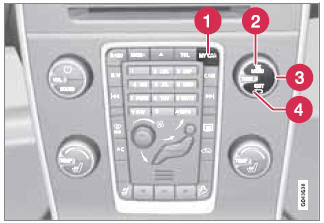
Center console controls for menu navigation
1 - Press MY CAR to access the My Car menus.
2 - Press OK/MENU to select a highlighted selection or to store a certain function in the system's memory.
3 - Turn to navigate up/down among menu selections.
4 - EXIT
EXIT functions
EXIT can be used to go back in the menu structure or to cancel the most recent selection. The results of pressing EXIT vary, depending on where you are in the menu structure.
- Press EXIT briefly to go back one step at a time in the current menu.
- Press and hold EXIT to go to the main MY CAR menu.
- From the main MY CAR menu, press and hold EXIT to go to the infotainment system's main view. See page 208 for additional information.
Test yourself
A quick Volvo XC60 quiz: every answer comes with an explanation and a link to the manual page.
Was this page helpful?