Infotainment
Infotainment mode buttons
In this manual: Infotainment
~1min read
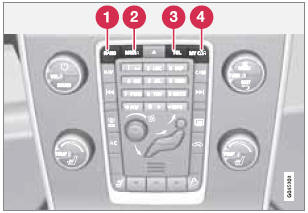
Press a button to select a mode
1 - RADIO: use to select AM, FM1, FM2, SAT1*1, SAT2*1
2 - MEDIA: use to select DISC, AUX, USB, iPod or Bluetooth*.
3 - TEL: Bluetooth® hands-free cell phone operation
4 - MY CAR – See page 133.
Test yourself
A quick Volvo XC60 quiz: every answer comes with an explanation and a link to the manual page.
Was this page helpful?