Audio system overview

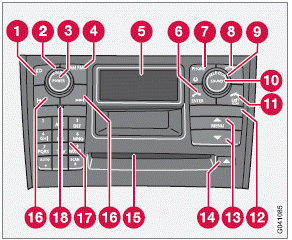
1 CD player
2 VOLUME – turn to adjust
3 POWER – On/Off
4 AM/FM – for switching between FM1, FM2 and AM
5 Display
6 ENTER – select in the menu or activate a selection
7 Not in use
8 MY KEY – programmable key for your favorite function from the menu
9 SELECTOR – select sound source
10 SOUND – make sound settings
11 EXIT/CLEAR – step back in the menu or cancel a selection
12 Not in use
13 MENU – menu selections/navigation
14 CD eject
15 CD slot, CD changer
16 search for and store the strongest radio stations in the area in which you are driving 17 Station preset buttons/selecct a disc in the CD changer (1-6)
18 IR Infrared port – for the optional navigation system remote control
Test yourself
A quick Volvo XC60 quiz: every answer comes with an explanation and a link to the manual page.