Locks and alarm
Using the information button
In this manual: Locks and alarm
~1min read

1. Press the information button  .
2. All of the indicator lights will flash sequentially for approximately 7 seconds to indicate that the PCC is receiving information from the vehicle. If any of the buttons are pressed during this 7-second period, transmission of information to the PCC will be interrupted.
The indicator lights provide information according to the illustration:
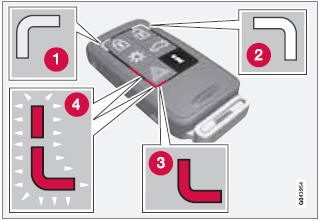
1 Steady green light: the vehicle is correctly locked.
2 Steady yellow light: the vehicle is not locked.
3 Steady red light: the alarm has been triggered.
4 Both red lights flash alternatively: the alarm was triggered less than 5 minutes ago.
Test yourself
A quick Volvo XC60 quiz: every answer comes with an explanation and a link to the manual page.
Was this page helpful?