Infotainment
Infotainment-Modustasten
In diesem Handbuch: Infotainment
~1Min. Lesezeit

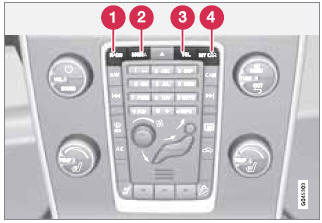
Drücken Sie eine Taste, um einen Modus auszuwählen
1 RADIO: Zur Auswahl von AM, FM1, FM2, SIRIUS1, SIRIUS2
2 MEDIA: Zur Auswahl von DISC, AUX, USB, iPod® oder Bluetooth.
3 TEL: Freisprechbetrieb des Bluetooth®-Mobiltelefons
4 MY CAR – Siehe Seite 133.
Testen Sie sich
Ein kurzes Quiz zum Volvo XC60: Zu jeder Antwort gibt es eine Erklärung und einen Link zur Handbuchseite.
War diese Seite hilfreich?