Memory function
Description
Applies to: vehicles with memory function
Using the memory function, you can quickly and easily store a personal seat profile for the driver and front passenger and recall the settings. The memory function is controlled using the remote control key and the memory buttons in the driver's/ front passenger's door.
The driver's seat profile is stored again and assigned to the remote control key each time the vehicle is locked. When you open the door, the seat profile is automatically recalled. If two people use the vehicle, it is recommended that each person always uses their "own" remote control key.
Two seat profiles can be stored using the memory buttons in the driver's/front passenger's door. Once they are stored, these seat profiles can be selected at any time.
The following settings are stored:
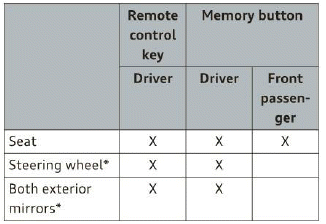
Remote control key
Applies to: vehicles with memory function
The driver's seat profile can be assigned to the remote control key when the vehicle is locked.
- Select: the [CAR] function button > (Car) Systems control button > Vehicle settings > Driver's seat > Remote control key > On.
Tips
If you do not wish to have the seat profile for another driver assigned to the remote control key, switch the memory function off in the Infotainment system or using the [OFF] button.
Memory buttons
Applies to: vehicles with memory function
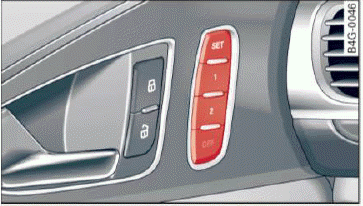
Fig. 56 Driver's door: memory function buttons
The memory buttons are located in the driver's/ front passenger's door.
Switching the memory function on/off
- Press the [OFF] button to switch the memory function on/off. The LED in the button turns on when the memory function is off. Seat profiles are neither stored nor recalled.
Storing a seat profile
- Press the I SET | button. When the word SET lights up, the memory is ready to store settings.
- Now press a memory button briefly. A tone confirms that the settings were stored.
Accessing a seat profile
- If the driver's door is open and the ignition is switched off, press the memory button.
- If the driver's door is closed or the ignition is switched on, press and hold the memory button until the seat adjustment is complete.
WARNING
- For safety reasons, the seat setting can only be recalled when the vehicle is stationary, otherwise there is a risk of an accident.
- If necessary, you can stop the recall process by pressing the [OFF] button or any memory button.
Adjusting the front passenger's seat in the Infotainment system
Applies to: vehicles with memory function
The driver can move the front passenger's seat into various positions.
Adjusting the front passenger's seat from the driver's seat
- Select: the [CAR] function button > (Car) Systems control button > Vehicle settings > Seats > Front passenger's seat > Adjust seat position.
- You can now adjust the front passenger's seat using the driver's seat buttons
 fig. 50.
Align with driver's seat
- To transfer the settings from the driver's seat to the front passenger's seat, select: the [CAR] function button > (Car) Systems control button > Vehicle settings > Seats > Front passenger's seat > Align with driver's seat.
- Press and hold the control knob until the adjusting process is complete.
Tips
The lumbar support and upper thigh support settings are not transferred when aligning the front passenger's seat with the driver's seat.