Mirrors
Exterior rear-view mirrors
The edge areas of the mirror provide a wider field of view than its center. As a result, the rear viewing angle increases and the so-called blind spot is reduced.
 Objects reflected in the mirrors are actually closer than they appear. For safety, do not judge the distance to vehicles behind you by observing them in the mirror.◄
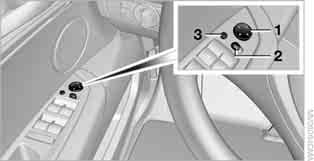
1 Adjustment
2 Mirror selection switch; automatic parking position switch
3 Folding and unfolding the mirrors. For programming mirror positions, see the subchapter Memory for seat, mirror and steering wheel positions.
Manual Adjustment
Adjust the mirror position by pressing on its edges.
Folding and unfolding the mirrors
Press button 3 to alternately fold and unfold the mirrors while driving at a speed of no more than 20 km/h. This can be useful, for example, in car washes, on narrow streets, or when you need to return the mirrors that were extended forward to their original position.
Folded mirrors unfold again when the speed exceeds 40 km/h.
To avoid damage, fold the mirrors manually or using button 3 before driving into an automatic car wash to reduce the vehicle's width.◄
Automatic heating
When the engine is running or the ignition is on, heating of both exterior mirrors switches on automatically.
Passenger-side mirror tilt down – automatic parking position
Activating the function
1. Move the switch to position 1 (driver's mirror).

2. Shift the automatic transmission into position R.
The passenger-side mirror tilts down slightly.
This allows the driver to see the area adjacent to the vehicle, making it possible to see the curb edge.
 When driving with a trailer, this automatic function is always deactivated.◄
Deactivating the function
Move the switch to position 2 (front passenger's mirror).
Interior Rear View Mirror
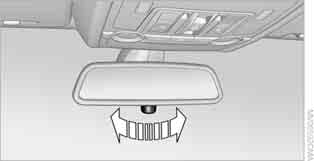
At night, turn the knob to reduce the glare from the headlights of vehicles behind you.
Interior and Exterior Mirrors with Automatic Dimming

Two photo sensors, one on the front and one on the back of the interior mirror, control this function.
For this function to work properly, do not cover the photo sensors (including with stickers or decals) and keep them clean.
Test yourself
A quick BMW X3 quiz: every answer comes with an explanation and a link to the manual page.