Displays in the instrument cluster
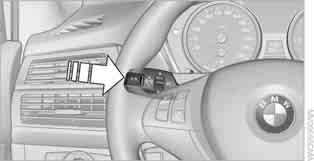
To display the readings, press the BC button on the turn signal lever.
The following information is shown on the display:
► Range
► Average speed
► Average fuel consumption
► DPC readings
Range
The predicted range on the fuel remaining in the tank is displayed. The range is calculated based on the average fuel consumption over the last 30 km.
 When the range is less than 50 km, be sure to refuel, otherwise you risk damaging the engine.◄
Average Speed
When calculating the average speed, stops with the engine switched off are not taken into account.
To reset the average speed, press and hold the BC button on the turn signal lever for 2 seconds.
Average Fuel Consumption
The average fuel consumption value is calculated over the entire time the engine is running.
To reset the average fuel consumption, press and hold the BC button on the turn signal lever for 2 seconds.
For two distances
The average speed and average fuel consumption values for two different distances can be displayed on the Control Display, see below and in the subsection Journey computer.
Test yourself
A quick BMW X3 quiz: every answer comes with an explanation and a link to the manual page.