Display on the Control Display
The on-board computer can also be opened via iDrive. For operating principles, see.
1. Press the button .
The main menu opens.
2. Move the controller to the right to open the "Navigation" menu.
Without navigation system: open the "OBC" (On-board information) menu.
3. Select "On-board Info" and press the controller.
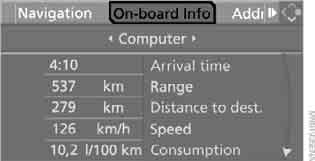
4. Select "Computer" and press the controller.
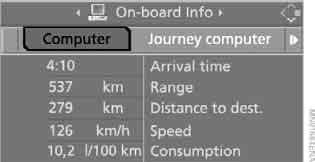
► "Arrival time" and "Distance to dest." – calculated arrival time and distance to the destination:
► Enter the distance manually in the on-board computer, see below.
► Enter a destination for the navigation system.
► "Range"
► "Speed" – average speed
► "Consumption" – average fuel consumption
Resetting values
You can reset the average speed and average fuel consumption values:
1. Select the corresponding menu item and press the controller.
2. To confirm the reset, press the controller again.
Entering the distance manually
1. Select "Distance to dest." and press the controller.
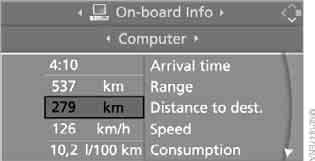
2. Turn the controller to enter the distance to the destination.
3. Press the controller to confirm the setting.
When guiding to a destination using the navigation system, the distance is set automatically.
Test yourself
A quick BMW X3 quiz: every answer comes with an explanation and a link to the manual page.