Operation
Settings and information
In this manual: Operation
~1min read
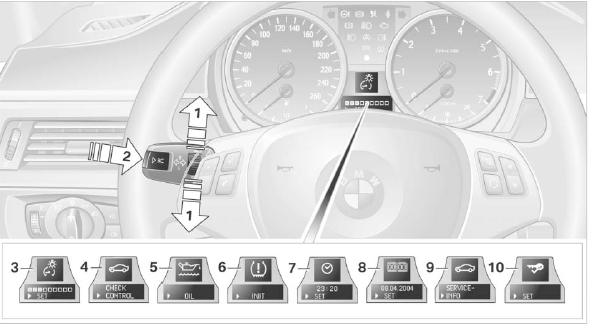
1 Button for:
► selecting a display;
► adjusting a value.
2 Button for:
► confirming the selected display or the adjusted value;
► displaying on-board computer information.
3 When the lights are on: adjusting the brightness of the instrument cluster illumination
4 Viewing the automatic diagnostic system information
5 Checking the engine oil level
6 Initializing the tire damage indicator
7 Setting the clock
8 Setting the date
9 Displaying the next scheduled maintenance indicator
10 Setting formats and units of measurement
Test yourself
A quick BMW X3 quiz: every answer comes with an explanation and a link to the manual page.
Was this page helpful?