At a glance
Menu structure
In this manual: At a glance
~1min read
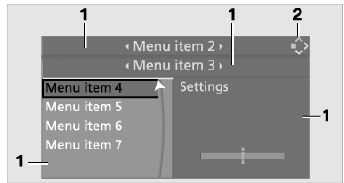
1 The menu is divided into fields. The active field is highlighted with a lighter background.
2 This symbol shows which menu you are currently in:
 “Communication”
 “Navigation system” or “On-board information”
 “Entertainment”
 “Climate”
 Menu I
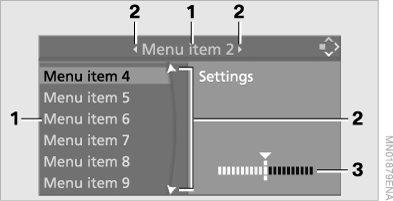
1 Menu items are grouped into lists (columns or rows).
2 Arrows indicate that not all items in the list fit in the window.
3 Settings are shown as graphs and figures.
Test yourself
A quick BMW X5 quiz: every answer comes with an explanation and a link to the manual page.
Was this page helpful?